Mapping Pay Groups
To map pay groups, use the Pay Group Mapping (GPUS_PYGRP_MAP) component.
Pages Used to Map Pay Groups
| Page Name | Definition Name | Usage |
|---|---|---|
|
GPUS_PYGRP_MAP |
Link pay groups created in Payroll for North America to pay groups created in PeopleSoft Global Payroll for United States. |
|
|
GPUS_PYGRP_ASGN |
Review employees' assigned pay groups. |
Understanding Mapping Pay Groups
To calculate benefit deductions, the system requires you to have a pay group for both the PeopleSoft Global Payroll for United States and Payroll for North America systems. When you hire an employee and assign a PeopleSoft Global Payroll for United States pay group, the system automatically uses the mappings defined on the Pay Group Mapping page to determine which Payroll for North America pay group to assign to the employee.
Pay Group Mapping USA page
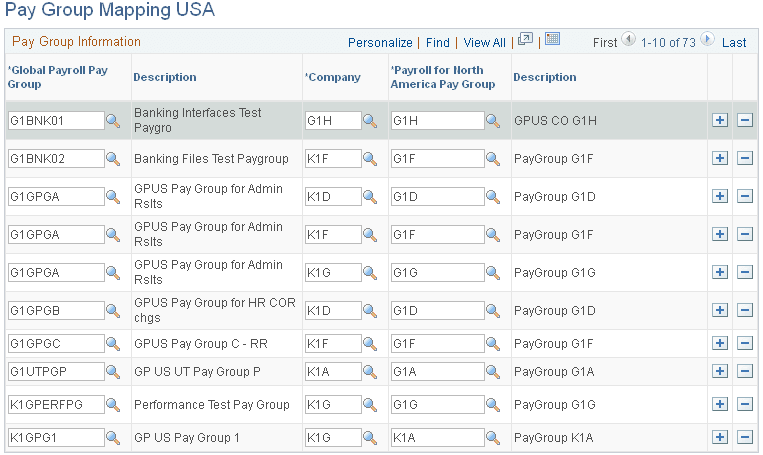
Use the Pay Group Mapping USA page (GPUS_PYGRP_MAP) to link pay groups created in Payroll for North America to pay groups created in PeopleSoft Global Payroll for United States.
Navigation:
This example illustrates the fields and controls on the Pay Group Mapping USA page.
| Field or Control | Description |
|---|---|
|
Global Payroll Pay Group |
Select the PeopleSoft Global Payroll for United States pay group you want to map. |
|
Company |
Select the company associated with the Payroll for North America pay group that you want mapped to the PeopleSoft Global Payroll for United States pay group. |
|
Payroll for North America Pay Group |
Select the Payroll for North America pay group that you want mapped to the PeopleSoft Global Payroll for United States pay group. |
WARNING:
After mapping the pay groups, do not delete any entries.
Pay Group Assignment USA Page
Use the Pay Group Assignment USA page (GPUS_PYGRP_ASGN) to review employees' assigned pay groups.
Navigation:
This example illustrates the fields and controls on the Pay Group Assignment USA page.
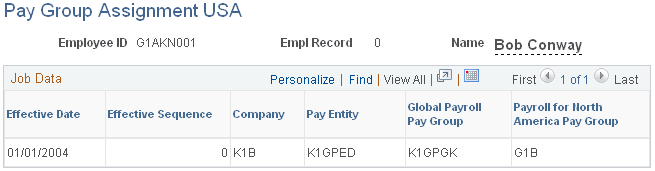
This page shows the Global Payroll and Payroll for North America pay group assignments for the selected employee. The automatically assigned Payroll for North America pay group is hidden in the Job Data component when the employee is assigned a payroll system of Global Payroll and a Global Payroll pay group is entered.