Reviewing Benefit Deductions
Pages Used to Review Benefit Deductions
| Page Name | Definition Name | Usage |
|---|---|---|
|
GPUS_BEN_SMRY |
View a summary of the employee's benefit enrollments and deduction amounts. |
|
|
Benefit Contribution Register Page |
GPUS_RUN_BEN003 |
Generate the Benefit Contribution Register report. You specify the date as of which you want to generate the monthly report. |
|
Savings Investment Distribution Page |
GPUS_RUN_BEN004 |
Generate the Savings Investment Distribution report. You specify the date as of which you want to generate the monthly report. |
Related Topics
Benefits Summary USA Page
Use the Benefits Summary USA page (GPUS_BEN_SMRY) to view a summary of the employee's benefit enrollments and deduction amounts.
Navigation:
This example illustrates the fields and controls on the Benefits Summary USA page.
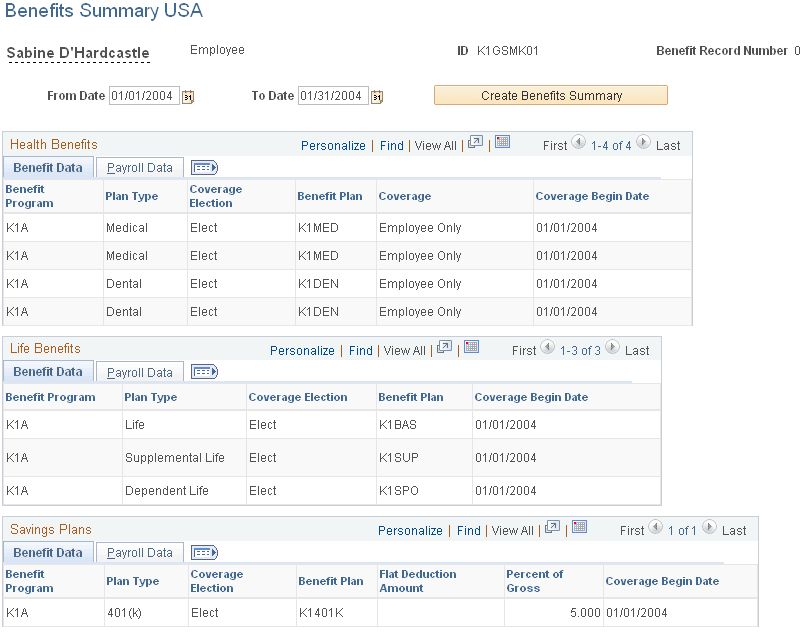
Complete the From Date and To Date fields, and then select the Create Benefit Summary button. The results will appear.