Absences and Segmentation
When you run the Take process, the system assigns an instance number to each event, based on the following rules:
-
If Multiple Instances is selected on the Absence Take - Calculation page, the system assigns a separate instance number to each like event that falls within the same absence period.
-
If Multiple Instances is not selected, the system assigns the same instance number to all like events that fall within the same absence period.
When the earning or deduction element that is associated with the take element is segmented, the Take process creates multiple instances, regardless of whether you selected Multiple Instances. Multiple instances are also created if the percent defined for the take element changes. (Percent is defined on the Generate Positive Input Member List on the Absence Take - Day Formula page.)
Example
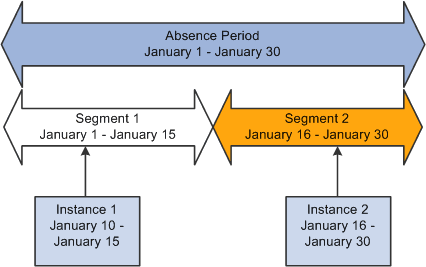
Payee A is absent from January 10 to 17. The earning element is segmented as shown below. The event is divided into the two instances.
This diagram illustrates how the system divides an event into multiple instances due to segmentation.