Adding Non-Rules to an Element Map
This topic describes the procedure for adding non-rule definitions to an element map, where the record's main key is not PIN_NUM.
To add a non-rule to an element map:
-
Use PeopleTools to create a SQL view for the record.
The view must have the same structure as your new record, as illustrated in the following example.
In the Select statement, enter + 50 000 000 after each field in the record that references a PIN number.
-
On the Define/Build page, add a row for the new record.
-
Complete these fields on the Define/Build page:
-
For Record Type, select Output Result Data, Payee Data, or Set up Definition.
-
For Record, select your new record.
-
For Export Record, select the view that you created in step 1.
-
For Effective Date Type, select the appropriate value for the record.
-
For Field Name, select any field in the record that references PIN_NUM.
-
In the Fields Referencing Other Elements group box, list each field within your record that contains a PIN number.
This includes the field name defined in step e. You can select only PIN_NUM.
-
Example
This illustration shows how your SQL statement should match the record structure.
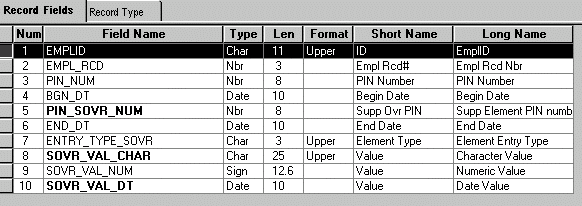
SELECT EMPLID
,EMPL_RCD
,PIN_NUM + 50000000
,BGN_DT
,PIN_SOVR_NUM + 50000000
,END_DT
,ENTRY_TYPE_SOVR
,SOVR_VAL_CHAR
,SOVR_VAL_NUM
,SOVR_VAL_DT
  FROM PS_GP_PYE_OVR_SOVR