Copying Packages
Note:
Copying packages alone does not prepare the package for export. You must also run the create rule or non-rule process, which attaches all elements to the package.
Pages Used to Copy Packages
| Page Name | Definition Name | Usage |
|---|---|---|
|
GP_PKG_COPY |
Copy an existing rule package and its selection criteria. This does not copy the element information. |
|
|
GP_NR_PKG_COPY |
Copy an existing non-rule package and its selection criteria. This does not copy the element information. |
Copy Rule Package Page
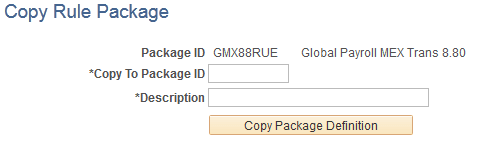
Use the Copy Rule Package page (GP_PKG_COPY) to copy an existing rule package and its selection criteria.
This does not copy the element information.
Navigation:
This example illustrates the fields and controls on the Copy Rule Package.
| Field or Control | Description |
|---|---|
|
Copy To Package ID |
Enter up to eight alphanumeric characters for the new package ID. |
|
Copy Package Definition |
Click to copy the package. |