Payment Keys with Forwarding Retro
Payment keys affect how adjustments are forwarded to the current period when retro is processed.
See Understanding the Organizational Structure.
Payment Keys and Forwarding
When the payment keys of the current period do not match those of the period that is being recalculated, adjustments must be managed as a separate gross-to-net in the current calendar period. For example, Company has been defined as a payment key. A payee who is working in company ABC moves to company DEF in the current period. There is retro going back to a prior calendar when the payee was in company ABC, and there are adjustments to the payee's current period coming from the prior calendar. The adjustments are associated with company ABC, and the current period is associated with company DEF. In this situation, the adjustments are managed as a separate gross-to-net in the current period.
When deciding whether and where to forward adjustments, the system:
-
Determines whether retro matching criteria have been satisfied.
If matching criteria have been satisfied, the system pulls retro deltas into the current period as adjustments.
-
Checks to see if you have defined payment keys based on criteria such as company ID, contract number, establishment, and department ID.
If you have defined payment keys, the system checks those keys to determine where to forward the adjustments. If the value of the payment keys that are attached to the forwarded adjustments is the same as the value in the current period, the system forwards adjustments to the first segment in the current period that has matching payment keys. If that segment includes slices, the system forwards adjustments to the first slice in that segment.
-
Creates a new segment in the current period (when it finds no segment with matching payment keys) to which to forward the adjustments.
The system manages the adjustments as a separate gross-to-net in the current period. The dates of the new segment are the dates of the calendar period as a whole, regardless of whether the current period is segmented.
The new segment has the status Inactive in Segment and goes through the process list like any other gross-to-net calculation. Earnings and deductions are resolved again in this segment. The result may not be what you want for this type of segment. To prevent the earnings and deductions from being resolved again in this segment, the user can define a generation control element to exclude segments with the status Inactive in Segment.
Positive input (PI) that is targeted to this calendar, as well as any generated PI topic, are not processed again in the Inactive in Segment segment, regardless of generation control.
See Understanding Calculation ElementsUnderstanding Processing Elements, Understanding Positive Input, .
Example 1: No Change in Payment Key Values
When the payment keys of the current period match those of the period that is being recalculated, the system forwards the adjustments to the current period. No new segments are created. Consider the following example of retro in February going back to January.
Scenario:
-
Company ID is defined as a payment key.
-
A payee's earning (E1) change from 500 to 900 retroactive to January. As a result, period 1 must be recalculated.
This graphic is an example of a payroll calculation in which there are no change to the payment key values.
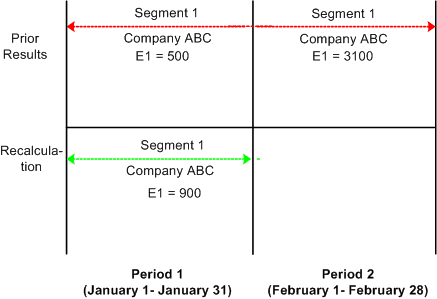
| Period 1 | Period 2 |
|---|---|
|
V1R1 |
V1R1 |
|
Segment 1 (January 1 - 31)/Company ABC E1 = 500 |
Segment 1 (February 1 - 28)/Company ABC E1 = 1300 (900 + 400) |
|
V1R2 |
|
|
Segment 1 (January 1 - 31)/Company ABC E1 = 900 Delta = 400 (900 - 500) |
Delta 400 is created in period 1; V1R2 is forwarded to period 2, V1R1, segment 1.
Example 2: Payment Key Value Changes in Current Calendar Period
When payment keys in the current period do not match those in the period that is being recalculated, the system creates a new segment in the current period to which to forward the adjustments. Consider the following example of retro in February going back to January.
Scenario:
-
Company ID is defined as a payment key.
-
A payee's earning (E1) change from 500 to 900 retroactive to January. As a result, period 1 must be recalculated.
-
On February 1, the payee transfers from company ABC to company DEF.
This graphic is an example of a payroll calculation in which the payment key value changes for the current calendar period.
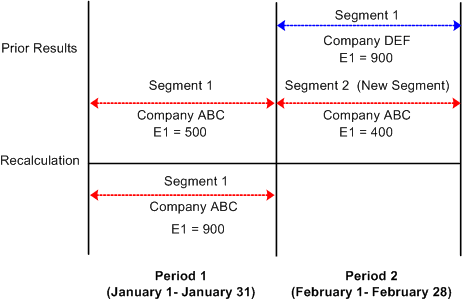
| Period 1 | Period 2 |
|---|---|
|
V1R1 |
V1R1 |
|
Segment 1 (January 1 - 31)/Company ABC E1 = 500 |
Segment 1 (February 1 - 28)/Company DEF E1 = 900 Segment 2 (February 1 - 28)/Company ABC E1= 400 |
|
V1R2 |
|
|
Segment 1 (January 1 - 31)/ Company ABC E1 = 900 Delta = 400 (900 - 500) |
Delta 400 is created in period 1; V1R2 is forwarded to period 2, V1R1, segment 2.
Because the payee in this example moves from company ABC to company DEF in February, the payment keys in the current calendar (February) no longer match those in the calendar that is being recalculated (January). As a result, the system creates a new segment (segment 2) in February into which to pull the adjustments from period 1, V1R2. The begin and end dates of the new segment are identical to those in the current period (February 1 - 28).
Payment Keys and Retro Deltas
If the value of a defined payment key changes retroactively, so that a calendar that is associated with one set of payment keys must be reprocessed using payment keys with changed values, the system recognizes this condition as a segment mismatch. If a segment match on payment keys doesn't exist between the prior and the current periods, a new segment is created in the current period for the forwarded adjustment that results from the deltas that have old payment keys. This process is illustrated in the example below.
Scenario:
-
A payee moves from company ABC to company DEF in February. The change is retroactive to January.
-
Company ID is defined as a payment key.
-
The payee's earning (E1) change from 500 to 900 retroactive to January. As a result, period 1 must be recalculated.
This graphic is an example of when a segment mismatch occurs during a payroll calculation.
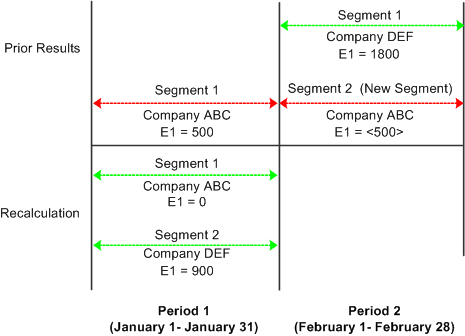
| Period 1 | Period 2 |
|---|---|
|
V1R1 |
V1R1 |
|
Segment 1 (January 1 - 31)/Company ABC E1 = 500 |
Segment 1 (February 1 - 28)/Company DEF E1 = 1800 (900 + 900) Segment 2 (February 1 - 28)/Company ABC E1= <500> |
|
V1R2 |
|
|
Segment 1 (January 1 - 31)/Company ABC E1 (reversal segment) = 0 Segment 2 (January 1-31)/Company DEF E1 (recalc segment) = 900 Delta=<500>, Company ABC Delta = 900, Company DEF |
-
Delta <500> is created in period 1; V1R2 is forwarded to period 2, V1R1, segment 2.
-
The delta 900 created in period 1, V1R2 is forwarded to period 2, V1R1, segment 1.
When calculating the retro delta for E1 in January, the system cannot match the new value of E1 (900) to the old value of E1 (500) and compute the difference as it ordinarily would (900 - 500 = 400). The old and new versions of E1 belong to different segments, are linked to different payment keys, and are no longer treated as counterparts. To determine the deltas, the system must first reverse the old value of E1 in V1R1; that is, it treats the prior calculation of E1 in period 1 as having no corresponding value in the new segment and subtracts 500 from 0 to generate a negative - 500. Likewise, it sees the new calculation of E1 in period 1 as having no corresponding value in the old segment and subtracts 0 from 900 to generate a new value of 900 for E1.
Note:
A segment mismatch also occurs when there is segmentation, and the segment dates of a recalculated period do not match those of the original period.
Summing Deltas by Payment Key
The preceding example illustrates an important rule: when summing and forwarding deltas, the system sums only deltas with the same payment keys, and deltas that are associated with one set of payment keys cannot be forwarded to an element linked to different keys. In the preceding example, the delta (<500>) created in period 1, V1R2, is not added to the delta (900) created in period 1, V1R2, because the deltas are associated with different payment keys.
Related Topics