Segmentation and Retro
Segmentation can affect retro processing when:
-
A segmented period is being recalculated for retro, and the segmentation dates of the original calculation don't coincide with those of the recalculation.
This is called a segment mismatch, and it affects how retro deltas are calculated.
-
Retro deltas are forwarded to a period that is segmented or sliced.
Note:
Segmentation also affects how the system manages the Retro Recalculation Option of Do Not Recalculate.
See Understanding Segmentation Setup.
Calculating Deltas in Matched and Mismatched Segments
The way that Global Payroll calculates deltas varies depending on whether the segmentation dates and payment keys of the prior period match those of the recalc period.
When Segments Match
When segment dates match and payment keys are the same, the system recalculates the original segments (to determine the new values for each segment), subtracts the old value from the new value for each element of pay (to determine the retro deltas), and writes new results to the output tables. (See Example 1: Retro With Matching Segments in this topic.)
When Segments Don't Match
When segments don't match, the system treats the old and new values as if they belong to separate segments.
-
The system creates reversal segments for each segment that existed in the prior calculation and then creates new recalc segments.
-
A reversal segment does not have any results because it does not go through gross-to-net processing. The only results that are written to the output result tables are for deltas and balance accumulators. When calculating deltas, the new values are assumed to be 0 (delta = new value [0] – old value).
The new recalc segments go through gross-to-net processing and generate the new values. The new values are written to the output result tables. When calculating deltas, the old values are assumed to be 0 (delta = new value – old value [0]).
See Understanding Segmentation Setup, Understanding the Organizational Structure.
Example 1: Retro with Matching Segments
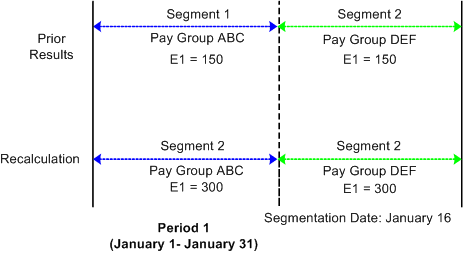
When the segment dates of the recalc period match those of the original period, retro processing is straightforward, as shown in the following example of retro going back to a segmented period.
Scenario:
-
The original January pay period is segmented due to a change in pay group that is effective on 16 January.
-
The January pay period must be recalculated for retro due to a change in E1 from 300 to 600 that is effective on January 1.
This diagram shows an example of retro with matching segments.
| Period 1 |
|---|
|
V1R1 |
|
Segment 1 (January 1–15)/ Pay Group ABC E1 = 150 Segment 2 (January 16–31)/ Pay Group DEF E1 = 150 |
|
V1R2 |
|
Segment 1 (January 1 - 15)/ Pay Group ABC E1 = 300 Segment 2 (January 16 - 31)/ Pay Group DEF E1 = 300 Delta = 150, Segment 1 (Pay Group ABC) Delta = 150, Segment 2 (Pay Group DEF) |
When the January pay period is reprocessed, the original segmentation dates are preserved. To determine the deltas for these segments, the system first matches segment 1 to segment 1 and segment 2 to segment 2. Then it subtracts the old value of E1 for each segment from the new value (E1 is defined to be prorated). As with retro without segmentation, the system recalculates each segment in the period and writes new values for each segment to the output result tables.
Note:
In this and subsequent examples, the original and recalculated calendars are marked with version and revision numbers (V1R1, V1R2, and so forth) for tracking recalculation of the calendar periods.
Example 2: Retro with Mismatched Segments
When the segment dates of the recalc period don't match those of the prior period, the system calculates retro deltas as described earlier in Calculating Deltas in Matched and Mismatched Segments.
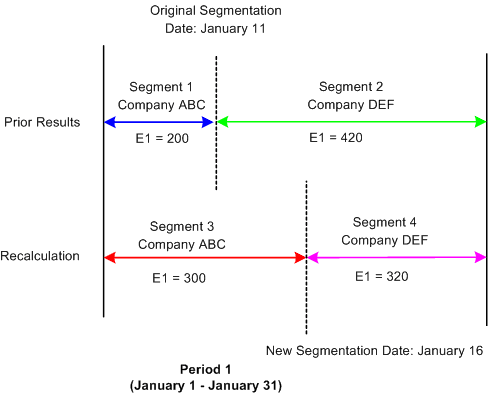
This is an example of retro going back to a segmented period. In this example, when the period is reprocessed during retro, the prior segmentation dates change.
Scenario:
-
The original January pay period is segmented when a payee moves from company ABC to company DEF, effective January 11.
-
The original pay period is recalculated when the effective date of the payee's company transfer changes from January 11 to January 16 (that is, the segmentation date changes from January 11 to January 16).
-
The payee's earning (E1) are 620 and are defined to be prorated.
| Period 1 |
|---|
|
V1R1 |
|
Segment 1 (January 1 - 10)/Company ABC E1 = 200 Segment 2 (January 11 - 31)/Company DEF E1 = 420 |
|
V1R2 |
|
Segment 1 (January 1 - 10)/Company ABC (reversal) E1 Delta = <200> Segment 2 (January 11 - 31 )/Company DEF (reversal) E1 Delta = <420> Segment = (January 1 - 15)/Company ABC (new recalc) E1 Delta = 300 Segment 4 (January 16 - 31)/Company DEF (new recalc) E1 Delta = 320 |
In this example, the original January pay period is segmented due to a change in company ID effective on the eleventh of the month. The January calendar is reopened for retro processing when the effective date of the company transfer changes from January 11 to January 16, which means that the segment dates for the original and recalculated periods do not match. When recalculating the calendar period for January, the system cannot match segment to segment as in the previous example—segments 1 and 2 no longer have exact counterparts in the recalculated period.
The values of segment 1 and 2 are reversed, resulting in negative deltas of - 200 and - 420 for segments 1 and 2, respectively. Then the system creates new recalc segments with unique, segmented status records in the recalc period—segments 3 and 4, whose deltas are 300 and 320. The system writes new values for each segment to the output result tables. For the reversal segments, only the balance accumulator and delta output result tables are updated.
Note:
When slice dates change, the differences between the original and recalc periods do not affect the calculation of the retro deltas. Only changes in the segmentation dates create the need for reversal segments.
Example 3: Mismatch in Changing Payment Key Values
The Global Payroll system also recognizes the following situation as a segment mismatch: when the value of a payment key (for example, company ID) changes between a prior calculation and the recalculation, Global Payroll treats the old and new calculations as belonging to separate segments—just as if the segment dates no longer matched.
Forwarding Adjustments in Retro with Segmentation
The way that Global Payroll forwards adjustments varies based on whether retro deltas are being forwarded to a sliced or segmented calendar and whether payment keys have been defined. Regardless of the situation, the system observes the following rules:
-
As in retro without segmentation, the system uses retro matching criteria to determine whether it can forward deltas to a calendar in the current period. In other words, the system forwards deltas only when the employee ID, record number, pay entity, pay group, and run type of the source calendar match those of the target calendar in the current period.
Note:
You can override pay group matching by selecting the Deltas Cross Pay Groups option on the Retro Limits page. If you do this, the system automatically brings retro deltas into the current period even if the pay group associated with the deltas does not match the payee's current pay group. In addition, you can override run type matching by specifying additional valid run types in the Retro Adjustments Sources group box on the Run Types page. If you do this, the system automatically brings retro deltas into the current period for those additional types even though the deltas do not match the payee's current run type. However, all other matching criteria must still be met.
See Retro Limits Page.
-
If all retro matching criteria are satisfied, but the current period is segmented, the system sums and forwards deltas to the first segment in the current calendar.
If that segment is sliced, the system forwards the adjustments to the first slice in that segment.
-
If you have defined payment keys based on criteria such as company ID, contract number, establishment, or department ID, adjustments are forwarded only to the first segment in the current calendar that has the same payment keys as the forwarded adjustments (after all retro matching criteria have been satisfied).
If that segment is sliced, the system forwards the adjustments to the first slice in that segment. If the system finds no segment with matching payment keys, it creates a new segment in the current period to which to forward the adjustments. The dates of the new segment are those of the calendar period as a whole, regardless of whether the current period is segmented.
Note:
The system uses retro matching criteria to determine whether to pull adjustments into the current period. If all the criteria are satisfied, the system forwards the deltas. If payment keys are used (in addition to the standard matching criteria), the system checks these keys to determine where to forward the adjustment. If the current period—or a segment in that period—has the same payment keys, the system forwards the adjustment to the first segment (or, if sliced, to the first slice in that segment) in the current period with matching payment keys. Only when the system finds no segment with matching payment keys does it create a new segment to which to forward the adjustments.
Example 1: Element Segmentation with Retro
The following example of element segmentation with retro illustrates how the system forwards deltas to the current period (assume that all retro matching criteria have been satisfied and that there are no payment keys).
Scenario:
-
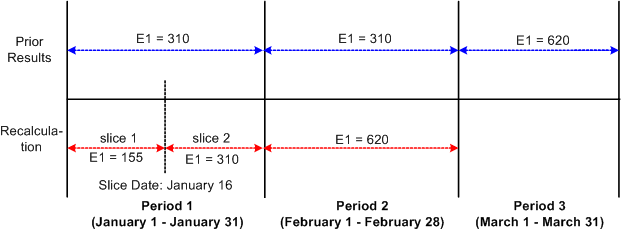
Retro in period 3 back to period 1 due to a change in the value of E1 from 310 a month to 620 a month on January 16 (assume that E1 is defined to be prorated).
-
E1 is on the element list for element segmentation and causes E1 to undergo segmentation into slice 1 and slice 2 in mid period—a period that was originally not segmented.
This diagram shows an example of element segmentation in the recalc period and no segmentation in the current calendar; there are no payment keys and retro match criteria are satisfied.
| Period 1 | Period 2 | Period 3 |
|---|---|---|
|
V1R1 |
V1R1 |
V1R1 |
|
Segment 1 (January 1 - 31) E1= 310 |
Segment 1 (February 1 - 28) E1= 310 |
Segment 1 (March 1 - 31) E1 =1085 [620 + (155 + 310)] |
|
V1R2 |
V1R2 |
|
|
Segment 1 (January 1 - 31) Slice 1 (January 1-15 ) E1 = 155 Slice 2 (January 16 - 31) E1 = 310 Delta = 155 [(155 + 310) - 310] |
Segment 1 (February 1 - 28) E1 = 620 Delta = 310 (620 - 310) |
-
Delta 155 is created in period 1; V1R2 is forwarded to period 3, V1R1, segment 1.
-
Delta 310 is created in period 2; V1R2 is forwarded to period 3, V1R1, segment 1.
When the system calculates retro deltas for period 1, it subtracts the old value of E1 in period 1 (310) from the sum of E1 in slices 1 and 2 (155 + 320). Just as in retro without segmentation, the system forwards all deltas to the current period (March) using retro matching criteria.
Example 2: Period Segmentation Combined with Retro
The following example of retro with period segmentation illustrates how the system moves retro deltas from a segmented recalc period into a segmented current period, selecting the first slice/segment as the forwarding target using retro matching criteria.
Scenario:
-
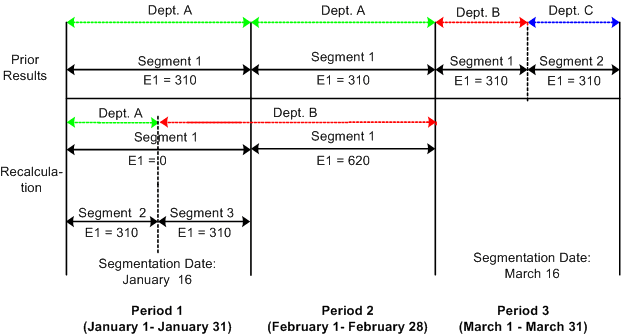
Retro in period 3 is back to period 1 due to a change in department ID (from department A to department B) on January 16, which triggered period segmentation in the January recalc calendar (assume that the original period was not segmented).
-
The value of E1 increases from 310 a month to 620 a month in March, retroactive to January 1 (assume that E1 is defined to be prorated).
-
On March 16, the department ID changes from department B to department C. This affects only the current period, resulting in a segmented current calendar.
This diagram below shows an example of period segmentation in both the recalc period and the current calendar; no payment keys are used and retro match criteria are satisfied.
| Period 1 | Period 2 | Period 3 |
|---|---|---|
|
V1R1 |
V1R1 |
V1R1 |
|
Segment 1 (January 1 - 31)/Dept. A E1 = 310 |
Segment 1 (February 1 - 28)/Dept. A E1 = 310 |
Segment 1 (March 1 - 15)/Dept. B E1 = 930 [310 + (310 + 310)] Segment 2 (March 16 - 31)/Dept. C E1 = 310 |
|
V1R2 |
V1R2 |
|
|
Segment 1 (January 1 - 31)/Dept. A E1 (reversal segment) = <310> Segment 2 (January 1 - 15)/Dept. A E1 = 310 Segment 3 (January 16 - 31)/Dept. B E1 = 310 Delta = 310 [(310 + 310) - 310] |
Segment 1 (February 1 - 28)/Dept. B E1 = 620 Delta = 310 (620 - 310) |
-
Delta 310 is created in period 1; V1R2 is forwarded to period 3, V1R1, segment 1.
-
Delta 310 created in period 2; V1R2 is forwarded to period 3, V1R1, segment 1.
The system calculates retro deltas for January by summing the deltas for the reversal segment (segment 1) with segments 2 and 3. And when it calculates the deltas for February, it subtracts the value of E1 in V1R1 from E1 in V1R2. The system then pulls the deltas from the January and February recalc periods (310 + 310) into the first segment of the current calendar that satisfies retro matching criteria—that is, segment 1 in the March payroll calendar.
Example 3: Period Segmentation Combined with Retro—Payment Keys Used
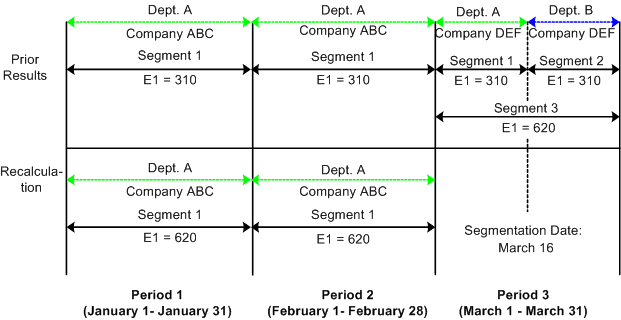
The following scenario illustrates how the system handles retro deltas when retro matching criteria have been satisfied, a payment key has been defined (in addition to the standard retro matching criteria), but the payment key of the recalc period does not match that of the current calendar.
Scenario:
-
The value of E1 increases from 310 a month to 620 a month in March, retroactive to January 1. This causes the January and February calendars to be recalculated.
-
On March 1, the payee transfers from company ABC to company DEF. Company ID is defined as a payment key.
-
On March 16, the department ID changes from department A to department B. This affects only the current period, resulting in a segmented current calendar.
This graphic is an example of a company defined as a payment key.
| Period 1 | Period 2 | Period 3 |
|---|---|---|
|
V1R1 |
V1R1 |
V1R1 |
|
Segment 1 (January 1 - 31); Dept. A, Company ABC E1 = 310 |
Segment 1 (February 1 - 28); Dept. A, Company ABC E1 = 310 |
Segment 1 (March 1 - 15); Dept. A, Company DEF E1 = 310 Segment 2 (March 16 - 31); Dept. B, Company DEF E1 = 310 Segment 3 (March 1 - 31); Dept. A, Company ABC E1 = 620 (310 + 310) |
|
V1R2 |
V1R2 |
|
|
Segment 1 (January 1 - 31); Dept. A, Company ABC E1 = 620 Delta = 310 (620 - 310) |
Segment 1 (February 1 - 28); Dept. A, Company ABC E1 = 620 Delta = 310 (620 - 310) |
-
Delta 310 is created in period 1; V1R2 is forwarded to period 3, V1R1, segment 3.
-
Delta 310 is created in period 2; V1R2 is forwarded to period 3, V1R1, segment 3.
When the system first calculates the retro deltas for January and February, it tries to pull them into the first segment of the current calendar (March) based on retro matching criteria. However, these deltas were generated for a payee in company ABC, and the payee is now in company DEF (there was a company transfer on March 1). Because Company is defined as a payment key, the deltas cannot be forwarded to the first segment of the current calendar (March) even though all other retro matching criteria have been satisfied. Therefore, the system creates a separate segment with the same begin and end dates as the March pay period and moves the deltas into the new segment.
Note:
These examples refer only to forwarding retro because only forwarding retro generates adjustments to be processed in the current period—unless your method is corrective, and you have defined elements to be forwarded. In the case of corrective retro combined with segmentation, the system calculates retro deltas as it does in the above examples. However, unlike forwarding retro, recalculated values for the elements replace the previous calculation. Differences between the net pay from the previously calculated period and the recalculated period are processed by banking.