Processing Preparations
This illustration shows the steps to prepare for payroll processing.
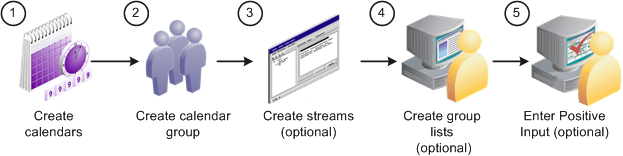
Here are the steps to prepare for payroll processing:
-
(Required) Create calendars.
Calendars tell the system which pay group, run type, process list, and calendar period to process. You define pay groups, run types, and process lists during system implementation. You can define calendar periods during implementation or when you set up your calendars.
Important:
You should not edit fields on the Calendar Period, Calendar, or Calendar Group ID pages after you initiate processing (other than to add payees to the Calendar, if you selected the Listed Payees option). To make changes to those pages, you must cancel the pay run.
-
(Required) Create the calendar group ID.
The calendar group ID identifies the set of calendars to run together and the sequence in which to process the calendars. If you want to use stream processing, you must indicate that when setting up the calendar group ID.
-
(Optional) Create streams.
To use stream processing, identify the range of employee IDs for each stream. Stream set up is a one time process that may require the assistance of a database administrator.
-
(Optional) Create group lists.
To use the group list feature, clerks who run the payroll process select the payees for each group list. (Group lists are linked to user IDs.)
-
(Optional) Enter positive input.
You can enter positive input for the pay period before or after you begin processing. If you enter positive input after you run the Calculate phase, run Calculate again to pick up your changes.
Related Topics