Processing Sequence
This illustration shows the payroll and absence processing steps.
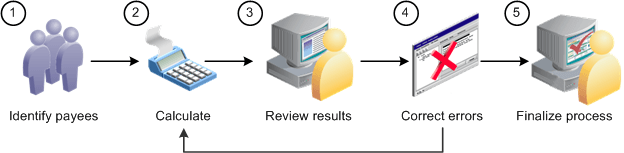
Here are the steps for running a payroll run or an absence run (use the Payroll/Absence Run Control page for steps 1, 2, and 5):
-
Identify payees (Identify phase).
The payroll cycle begins when you run a process that identifies all payees that are to be processed.
-
Perform calculations (Calculate phase).
This phase computes each payee's gross and net earnings (for a payroll run) or absence take or entitlement units (for an absence run).
-
Review results.
If the system encounters problems during the Calculate phase—for example, invalid element definitions or payee eligibility problems—it places the payee in error. You can use various pages to review summary results, errors, and warning messages.
-
Correct any errors and recalculate.
To correct errors, you may need to update the Positive Input pages or make changes to the data in other applications that are integrated with Global Payroll, such as HR or Time and Labor. You can then run the Calculate phase again to process only the payees that need to be recalculated.
-
Finalize the run.
When you're satisfied with the processing results, run the Finalize phase to close the calendar group ID.