The Processing Structure
This diagram shows the components of the Global Payroll processing structure.
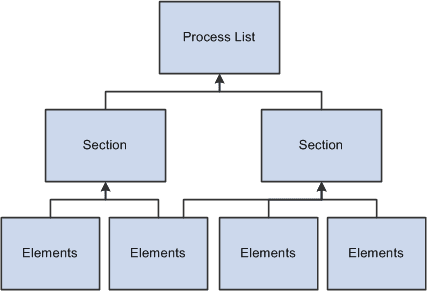
Process List
A process list specifies the order in which gross and net pay elements are processed and resolved. You add these elements to the process list by using sections. You add sections to your process list; the sections are processed in the order in which you insert them into the list. You can also execute sections conditionally.
The process list is where you indicate whether you are calculating an absence or a payroll. You use separate calendars for absence and payroll processing runs, so you must create separate process lists for absence and payroll runs.
On the Process List - Definition page you indicate what type of calculation is taking place. If the calculation type is absence, then the gross, net pay, and minimum net element name fields are not available. If the calculation type is payroll, then the gross and net pay element name fields are required. The minimum net element is optional. If the minimum element is not entered, the minimum net amount is considered to be zero. When you enter the gross and net pay element names, you are referencing the gross and net accumulators.
The net pay element and minimum net element are used during deduction arrears processing. The deduction amount is compared to the net plus minimum to see if the deduction can be taken. If the net plus minimum is less than the deduction, the system follows its own set of rules to process the deduction.
The net and gross element numbers and values are stored in output tables so that you can access this data for reporting and online inquiries.
Section
A section is a grouping of elements and controls the order that those elements are processed on the process list. Five types of sections are used for different types of processing:
-
Standard sections are used during an absence run, a payroll run, or both.
-
Sub process sections are used for payroll runs and can be used for gross-ups.
-
Payee sections are used for payroll runs.
Payee sections are used for garnishments or any other element that needs to provide the flexibility to distinguish which elements should be processed, and the order, at the payee level.
-
Generate Positive Input sections are used during an absence run, a payroll run, or both.
This type of section can be used to create positive input for different calendars.
-
Absence Take section are used for absence runs.
You can use this type of section to process absences in date sequence.
Once you have defined a section, you can reuse it in multiple process lists.
Elements
Elements are the basic building blocks in Global Payroll. Some stand alone while others use several simple elements (called supporting elements) that are combined to form more complex elements.
During a payroll or absence processing run, the system resolves each element in the process list for each payee. The elements that are resolved depend on a payee, so the resolved value of an element depends on which payee is under consideration.
Related Topics