Status Codes and Process Indicators
Status codes and process indicators play an important role in payroll and absence processing. Status codes help you monitor and interpret the processing results; process indicators enable you to manually enter processing instructions for specific payees. This topic focuses on how the codes are created and how to interpret them.
Status Codes
The system creates two sets of status codes as it identifies each payee for processing:
-
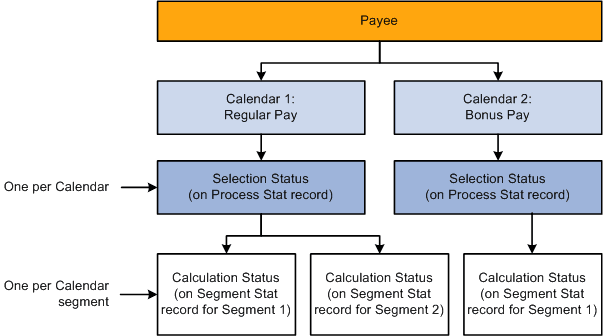
One selection status code for each payee for each calendar, which it stores on the Process Stat (process status) record. During the first run of the Identify phase, each payee's selection status is set to Active or Inactive to explain why the payee was identified for processing. With each iteration of the Calculate phase, the system updates the status to explain why the payee was included in or excluded from processing.
The system keeps a record of excluded payees only if they were suspended or canceled. If the payee simply no longer qualifies for selection (for example, the payee is assigned to a different pay group), the system does not record this, and the payee's process and status records are deleted.
-
One calculation status code for each payee, per calendar segment, which is stored on the Segment Stat record. If a calendar has no period segmentation, a payee has one calculation status. Calculation status tells you the most recent action that has been completed for the segment, for example, identified, calculated, in error, or frozen. Before you run the Calculate phase for the first time, the status code for each identified payee is Identified.
This diagram shows how the system creates status codes when it identifies payees for processing.
Process Indicators
Sometimes you might need to cancel a payee from a payroll or an absence run; temporarily suspend a payee from processing; freeze, unfreeze a payee; or take some other action at the payee level. You do this by entering a process indicator that tells the system what action to take during the next iteration of processing. For example, if the selection status for payee A is Active, and you need to cancel that payee from the pay run, set the payee's process indicator to Cancel. The next time you run the Calculate phase, the system deletes all calculation results for payee A and changes payee A's selection status to Cancelled. You update the process indicator on the Payee Status component.
Important:
Changing a process indicator updates all of a payee's segments that are in the same calendar group ID.
Status Code and Process Indicator Definitions
The tables below list the status codes and process indicators. Selection status (one per payee per calendar) and calculation status (one per calendar segment) are system-maintained; the process indicator is user-maintained.
| Selection Status | Definition |
|---|---|
|
Active |
Payee was active for at least one day within the calendar. |
|
Inactive |
Payee was not active within the calendar, but was selected because of positive input, a retroactive trigger, or a forwarded adjustment. |
|
Cancelled |
You manually canceled the payee from the calendar run. The system doesn't re-select the payee for the current calendar run or a retroactive run. |
|
Suspended by User |
You manually suspended the payee from the calendar run. The next time you run Calculate, the system tries to reidentify the payee and recalculate the net pay. |
|
Suspended by System |
The payee is linked to another open calendar group ID. (A payee can be selected for only one unfinalized calendar group ID at a time.) |
| Calculation Status | Definition |
|---|---|
|
Identified |
Segment has been identified for calculation but has not been calculated. |
|
Calculation Successful |
Segment has been calculated. |
|
Frozen For Further Calc |
Segment is not subject to further calculations unless you unfreeze it or run the Recalculate All phase. |
|
Finalized |
The calendar run has been finalized. You can no longer make changes. |
|
Finalized — With Banking |
Segment has been finalized and run through the Banking process. This status occurs if you run the Finalize step and then the Banking process. |
|
Calculation Error |
An error occurred during calculation. |
|
Calculation Error — Bypassed |
The system did not attempt to calculate the payee because of an error. |
|
Calculation Error — By Rule |
An error was produced because of a condition that you defined through a message element. |
|
Has No Segment |
Segment contains no scheduled payment. |
| Process Indicator | Definition |
|---|---|
|
Normal |
This initial setting appears after each calculation. It indicates that there are no special processing instructions for this payee. |
|
Cancel |
The payee will be canceled from the payroll or absence process during the next iteration of the Calculate phase. The selection status will be changed to Canceled. The payee will not be identified again unless you change the indicator to Uncancel before finalizing the pay run. |
|
Recalculate |
All calculations that are associated with the payee's jobs (employee ID and employee record number combination) will be rerun the next time you run the Calculate phase. This is similar to the Recalculate All option on the Payroll/Absence Run Control page, but it applies only to payees that you select. |
|
Suspend |
The payee will be withheld from processing the next time you run the Calculate phase. The selection status will be changed to Suspended by, and all calculation results will be deleted. During subsequent calculations, the system will try to reidentify and recalculate the payee (until it succeeds or you cancel the payee). You do not need to take any action. |
|
Uncancel |
The system will change the selection status from Canceled to Active, Inactive, or whichever selection status is appropriate and will try to reidentify and recalculate the payee the next time the Calculate phase runs. |
|
Freeze |
The payee is not subject to recalculation unless you select Recalculate All or Un-freeze on the Payroll/Absence Run Control page or the Payee Status page. |
|
Unfreeze |
Reverses a payee's freeze status. |
|
Final Calculation |
This is an indicator that allows a customer utilising the HCM Lockdown framework to run a final calculation if they want the system locked down, from the initiation of their final calculation through the completion of the Finalize phase. |