Viewing Processing Statistics
The Processing Statistics component displays high-level processing results:
-
The number of payees that are identified, in error, calculated, or finalized.
-
The number of active, inactive, canceled, and suspended payees.
Pages Used to View Processing Statistics
| Page Name | Definition Name | Usage |
|---|---|---|
|
GP_CALRUN_STAT1 |
View processing statistics for the payroll run or absence run by calendar group. First, run the Identify phase. |
|
|
GP_CALRUN_STAT2 |
View processing statistics for the payroll run or absence run by calendar. |
Processing Statistics - By Calendar Group Page
Use the Processing Statistics - By Calendar Group page (GP_CALRUN_STAT1) to view processing statistics for the payroll run or absence run by calendar group.
First, run the Identify phase.
Navigation:
This example illustrates the fields and controls on the Processing Statistics - By Calendar Group page.
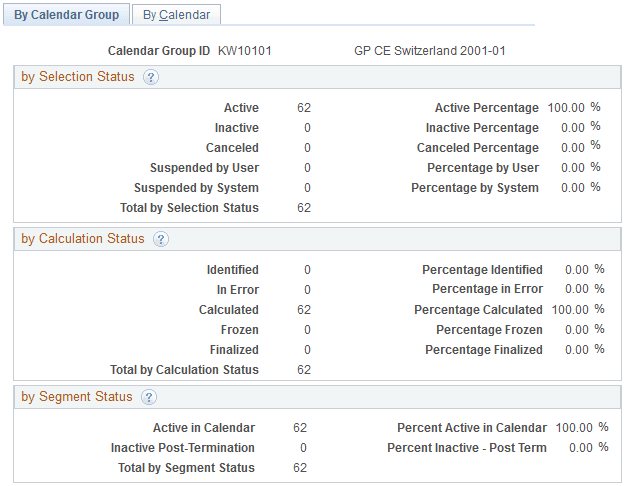
by Selection Status
| Field or Control | Description |
|---|---|
|
Active |
Payees that were identified for processing because they were active for at least one day within the calendar period. Excludes payees with the selection status Cancelled or Suspended. |
|
Inactive |
Payees that were identified for processing because they were inactive but had positive input, a retroactive trigger, or forwarded adjustment. |
|
Cancelled |
Payees that you manually cancelled from the calendar group ID on the Payee Status page. |
|
Suspended by User |
Payees that you manually suspended from the calendar group ID through the Payee Status page or the Payroll/Absence Run Control page. |
|
Suspended by System |
Payees that the system suspended because the payee was also identified in another open calendar group ID. |
by Calculation Status
This group box displays the number of payees with each calculation status, followed by the percentage that each number represents.
by Segment Status
This group box displays the number of active and inactive payees, followed by the percentage that each number represents.
| Field or Control | Description |
|---|---|
|
Active in Calendar |
Payees that were identified because they were active for at least one day within the calendar period. |
|
Inactive Post-Termination |
Payees that are being paid for a period of time when they were inactive (such as a sales commission paid to a person that has left the company) or for a forwarding retroactive situation where there is a mismatch on the payment keys. |
Related Topics
Processing Statistics - By Calendar Page
Use the Processing Statistics - By Calendar page (GP_CALRUN_STAT2) to view processing statistics for the payroll run or absence run by calendar.
Navigation:
The fields on the By Calendar page are the same as those on the By Calendar Group page, but they reflect the results for an individual calendar.
To view statistics for the next or previous calendar that is associated with this calendar group ID, click the scroll arrows on the Calendar Statistics title bar.
Related Topics