Time Management Alerts Pagelet
The Time Management Alerts pagelet displays time related events and occurrences alerts.
This example illustrates the fields and controls on the Time Management Alerts pagelet. You can find definitions for the fields and controls later on this page.
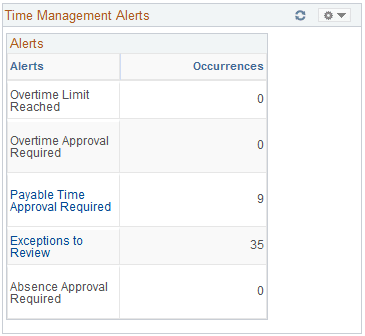
Alert links on this pagelet are active only if there are occurrences to report and action to be taken.
The pagelet uses time and labor group security or defaults to department security to determine employees reporting to a manager, depending on the association to the manager's row security permission list. In addition, the date is determined as the current date, unless the time and labor system date is enabled on the Time and Labor Permission List page for the manager's row security permission list.
Note:
This page requires implementation of Time and Labor.
| Field or Control | Description |
|---|---|
|
Overtime Limit Reached |
Click to access the View Overtime Balances page where you can view detailed information regarding overtime limits reached by employees. Click Get My Employees or Get Employees in Group on the View Overtime Balances page to view the overtime limits and balances. The occurrences equal the count of the employees that are shown to have exceeded their overtime limit when you view overtime balances. |
|
Overtime Approval Required |
Click to access the Approve Overtime Requests page where you can view and approve overtime requests for employees. The occurrences indicate the number of requests to be approved. This value equals the count of the employees that appear on the Select an Employee Request page. |
|
Payable Time Approval Required |
Click to access the Approve Payable Time page where you can view and approve reported payable time. The occurrences indicate the number of rows of payable time to be approved. |
|
Exceptions to Review |
Click to access the Manage Time Exceptions page where you can view time reporting exceptions generated through time reporting. The occurrences indicate the number of exceptions to review. |
|
Absence Approval Required |
Click to view and approve Global Payroll absence requests for employees. This link only displays if Global Payroll is installed. The occurrences indicate the number of absence requests to be approved. |
Related Topics