Workforce Availability Pagelet
The Workforce Availability pagelet displays summarizes current availability and general absence information.
This example illustrates the fields and controls on the Workforce Availability pagelet. You can find definitions for the fields and controls later on this page.
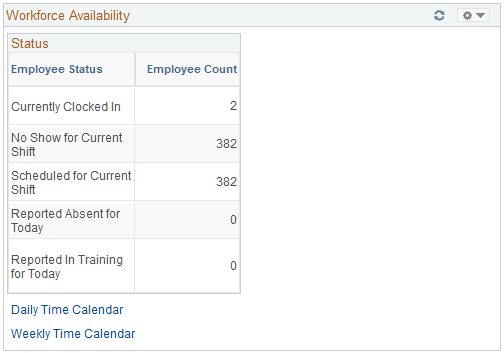
Click the Customize button in the upper right-hand corner to define which statuses display in the Employee Status column.
To populate the Employee Count field for the Reported Absent for Today status, the system checks for any absences reported in PeopleSoft Absence Management whether they are designated for PeopleSoft Payroll for North America or for Global Payroll.
The system uses data from the PeopleSoft Enterprise Learning Management application to update the Employee Count field for the Reported in Training for Today status. However, you must enable the application to retrieve the data. To send the training data, the system uses the Scheduled Time Fullsync and Scheduled Time Sync messages. Training data is stored in the PS_SCH_EXT_DTL record.
| Field or Control | Description |
|---|---|
|
Daily Time Calendar and Weekly Time Calendar |
Click to access the Daily Time Calendar and Weekly Time Calendar pages to view current time-related information on employees. These time calendars provide more detailed information regarding availability details. |
Related Topics