Understanding the Administer Compensation Total Rewards Statement
Employers recognize that compensation and benefits are integral to their ability to keep and attract employees who foster excellence in their jobs. A total rewards statement is used to increase the employee’s awareness of the total value of compensation (both salary and benefits).
A total rewards statement shows the employee’s full value of their rewards including employer contributions to benefits, cash compensation, non-cash compensation, perks, and so on. This functionality provides:
-
A summary of an employee’s total rewards at a glance.
-
A breakdown of an employee’s total rewards, including explanations and content information, links to existing employee reward details or third party vendors, and analytic charts.
-
A view of all rewards, including non-cash compensation.
-
The ability to generate and print total rewards statements.
This graphic illustrates the process for defining and administering a total rewards statement.
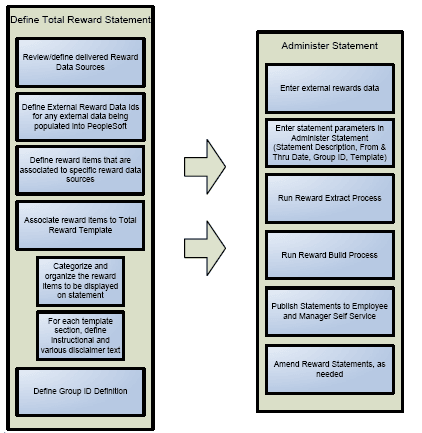
To implement the Total Rewards feature you use these building blocks:
-
Reward Data Source definition - a menu, component, pages, and tables that store information about the attributes of a reward data source. The reward data sources that are currently used include:
-
North American Payroll Earnings.
-
North American Payroll Deductions.
-
North American Payroll Taxes.
-
Benefit Leave Balance.
-
Stock Administration.
-
External Compensation Data.
-
-
External Reward Data Definition - A component that enables the compensation administrator to define external reward data that is loaded into PeopleSoft.
-
Reward Item - Table containing multiple items of reward data retrieved from a reward data source. Reward items are displayed on a total reward statement.
-
Reward Template - Table containing multiple templates detailing the structure and layout of reward items displayed on a total reward statement.
-
Rewards Extract Process - An application engine process that extracts reward data for specific total reward statements.
-
Reward Build Process - An application engine process that builds and summarizes sections in the total reward statement. This process also performs any currency conversions to display the employee’s total reward statement in the currency defined on the employee’s HR primary job record.
-
Administer Statement Component - A component that enables the compensation administrator to manage the end-to-end process of generating total rewards statements.
Given the appropriate role permission, total rewards statements can be accessible by:
-
Employees who can view their own statements through Employee Self Service.
-
Managers who can view statements of their direct reports through Manager Self Service.
-
Administrators who can view statements of individuals on the Administer My Total Rewards page.