Setting Up Religions, Ethnic Groups, and Holiday Types
To set up religions, ethnic groups, and holiday types, use the Religions MYS/SGP (RELIGION_TBL_FA), Ethnic (ETHNIC_GROUP_GBL), and Modify a Person (PERSONAL_DATA) components.
This topic identifies the pages used to set up religions, ethnic groups, and holiday types.
Pages Used to Set Up Religions, Ethnic Groups, and Holiday Types
| Page Name | Definition Name | Usage |
|---|---|---|
|
RELIGION_TBL_FA |
Set up religions and then select a corresponding festive advance holiday type. |
|
|
PeopleSoft Human Resources Administer Workforce: Ethnic Groups Page |
ETHNIC_GROUP_GBL |
Set up ethnic groups. |
|
PeopleSoft Human Resources Administer Workforce: Add a Person or Modify a Person - Regional Page |
PERSONAL_DATA3 |
Set up the employee's default religion and ethnic group. |
Religions MYS/SGP Page
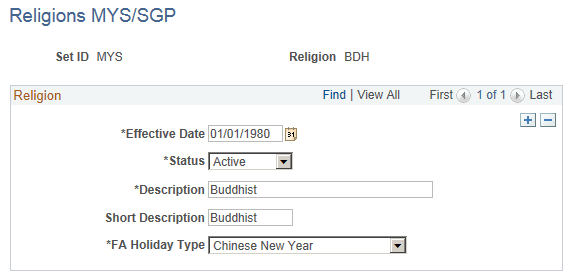
Use the Religions MYS/SGP page (RELIGION_TBL_FA) to set up religions and then associate religions with a festive advance holiday type.
Navigation:
This example illustrates the Religions MYS/SGP page.
| Field or Control | Description |
|---|---|
|
FA Holiday Type (festive advance holiday type) |
Select the holiday that is associated with the religion for festive advance purposes. Values include Chinese New Year, Chrismas, Deepavali, Hari Raya, and Value Not Applicable. |