Moving Students Between Course Sessions
Use the Express Rescheduling component to review and update information about students who are enrolled in active course sessions or are on waiting lists. You can move students from one session to another, change their enrollment status, and designate a form letter to send. Although you can change student status, you can't add or remove students from a course.
This topic lists pages used to move students between course sessions.
Page Used to Move Students Between Course Sessions
| Page Name | Definition Name | Navigation | Usage |
|---|---|---|---|
|
COURSE_RESCHEDULE |
|
Move students between course sessions. |
Training Reschedule Sessions Page
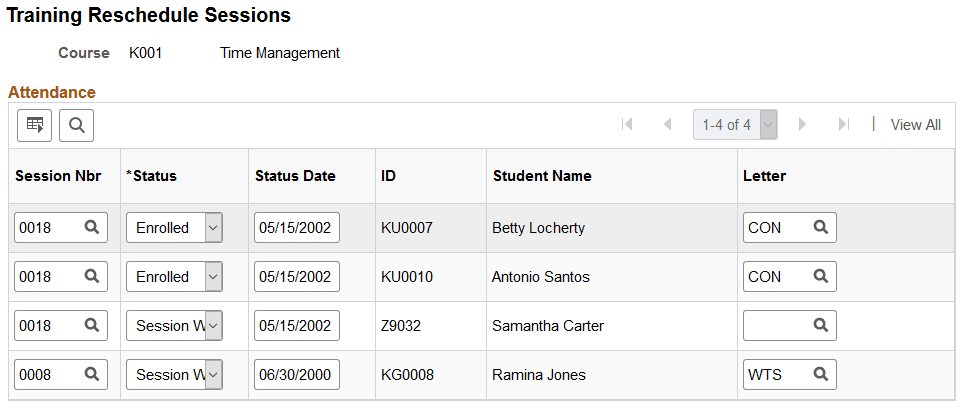
Use the Training Reschedule Sessions page (COURSE_RESCHEDULE) to move students between course sessions.
Navigation:
This example illustrates the fields and controls on the Training Reschedule Sessions page. You can find definitions for the fields and controls later on this page.
| Field or Control | Description |
|---|---|
|
Session Nbr |
Displays session numbers for enrolled or wait-listed students. To enroll a student in a session, select the session number. |
|
Status |
Values are: Enrolled: Enroll a student in the session that you selected in the Session # field. Crse Wait Sessn Wait |
|
Status Date |
When you select a different status for a student, the system updates this field. |
|
Letter Code |
Changes according to the status. The next time that you generate training letters, the system creates a letter of the type that is defined by the letter code. |
Note:
If the number of enrolled students in a session exceeds the maximum number allowed, you receive a warning message.
Related Topics