Managing Driver's License Information
This topic discusses how to enter license numbers and other driving record information.
Page Used to Manage Driver's License Information
| Page Name | Definition Name | Usage |
|---|---|---|
|
DRIVERS_LIC_GBL |
Enter license numbers or other data from a worker's driving record. |
|
|
DRIVERS_LIC_BRA |
Enter license numbers or other data from a worker's driving record. |
Driver's License Data Page
Use the Driver's License Data page (DRIVERS_LIC_GBL) to enter license numbers or other data from a worker's driving record.
Navigation:
This example illustrates the fields and controls on the Driver's License Data page. You can find definitions for the fields and controls later on this page.
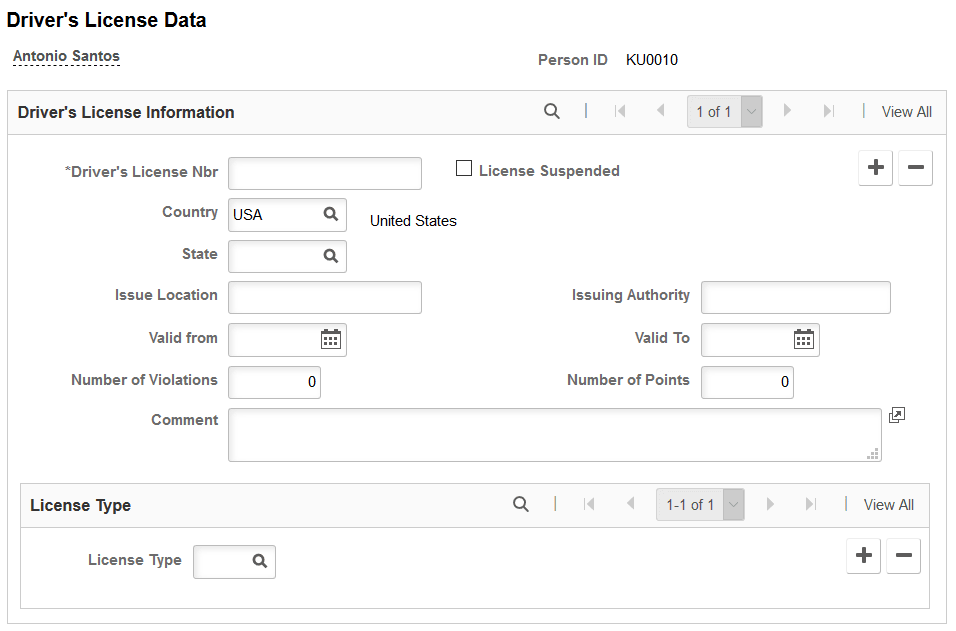
| Field or Control | Description |
|---|---|
|
Driver's License Nbr (Driver's License Number) |
Enter the license number. |
|
License Suspended |
Select if the worker's driver's license is currently suspended. |
|
Issue Location |
Enter the location where the license was issued. |
|
Issuing Authority |
Enter the agency that issued the driver's license, such as the Department of Motor Vehicles. |
|
Valid from and Valid To |
Enter the dates on which the driver's license remains valid. The to date must be in the future. |
|
Number of Violations |
Enter the number of traffic violations cited on the worker's driving record. |
|
Number of Points |
Enter the number of points accumulated on the worker's driving record. |
|
License Type |
Enter the type of license held by the worker. |
If you need to enter more than one driver's license for a worker, add a new data row.
(BRA) Driver’s License BRA Page
Use the Driver's License BRA page (DRIVERS_LIC_BRA) to enter license numbers or other data from a worker's driving record.
Navigation:
This page is almost identical to the Driver's License Data Page, except for the field described below.
| Field or Control | Description |
|---|---|
|
First Issuance Date |
Enter the date that the driver’s license was first issued. This information is used in eSocial reporting. |
|
Preferred |
Select a preferred driver’s license type. Select only one preferred license type for each license number. |