(OnBoarding phase only) OnBoarding Document Acknowledgement Page
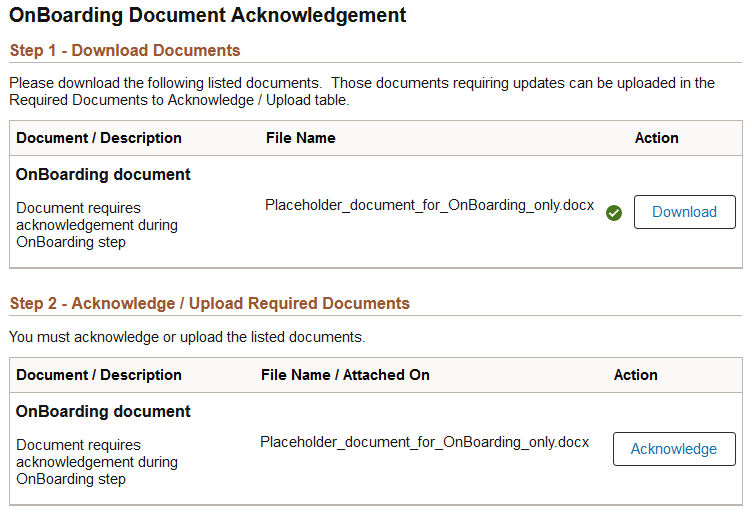
Use the OnBoarding Document Acknowledgement page (HR_OBD_ATT_DNLD_FL) to view, acknowledge, or upload documents provided by the organization as of your first day of work.
Note:
This page is delivered as part of the Standard PreBoarding template and is available for current workers only as of the first day of work.
Note:
You can configure your activity guides to use document groups and filter your documents by categories. This enables you to display like documents in different steps. For more information on this, see Understanding Document Groups.
Navigation:
Select the step from the activity guide navigation or use the navigation buttons.
This example illustrates the OnBoarding Document Acknowledgement page for a tablet.
This example illustrates the OnBoarding Document Acknowledgement page for a smartphone.
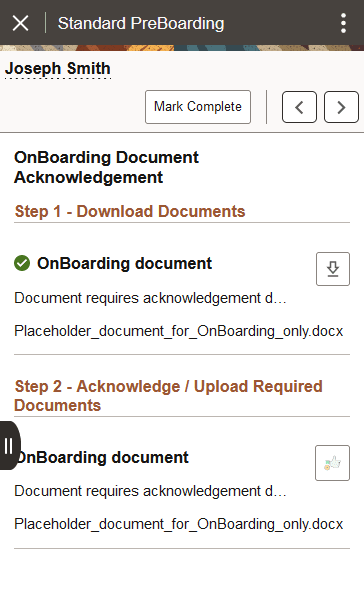
Use this page to view the documents for this OnBoarding process.
This page works the same as the other document pages. See the (PreBoarding phase) PreBoarding Document Acknowledgement Page for a full list of field descriptions.
Related Topics