Social Security Scheme Table - Contribution Page
Use the Contribution page (SOCS_CONTRIB_ESP) to define the contribution rates and percentages for both employees and employers used in the social security calculation.
Navigation:
This example illustrates the fields and controls on the Contribution page.
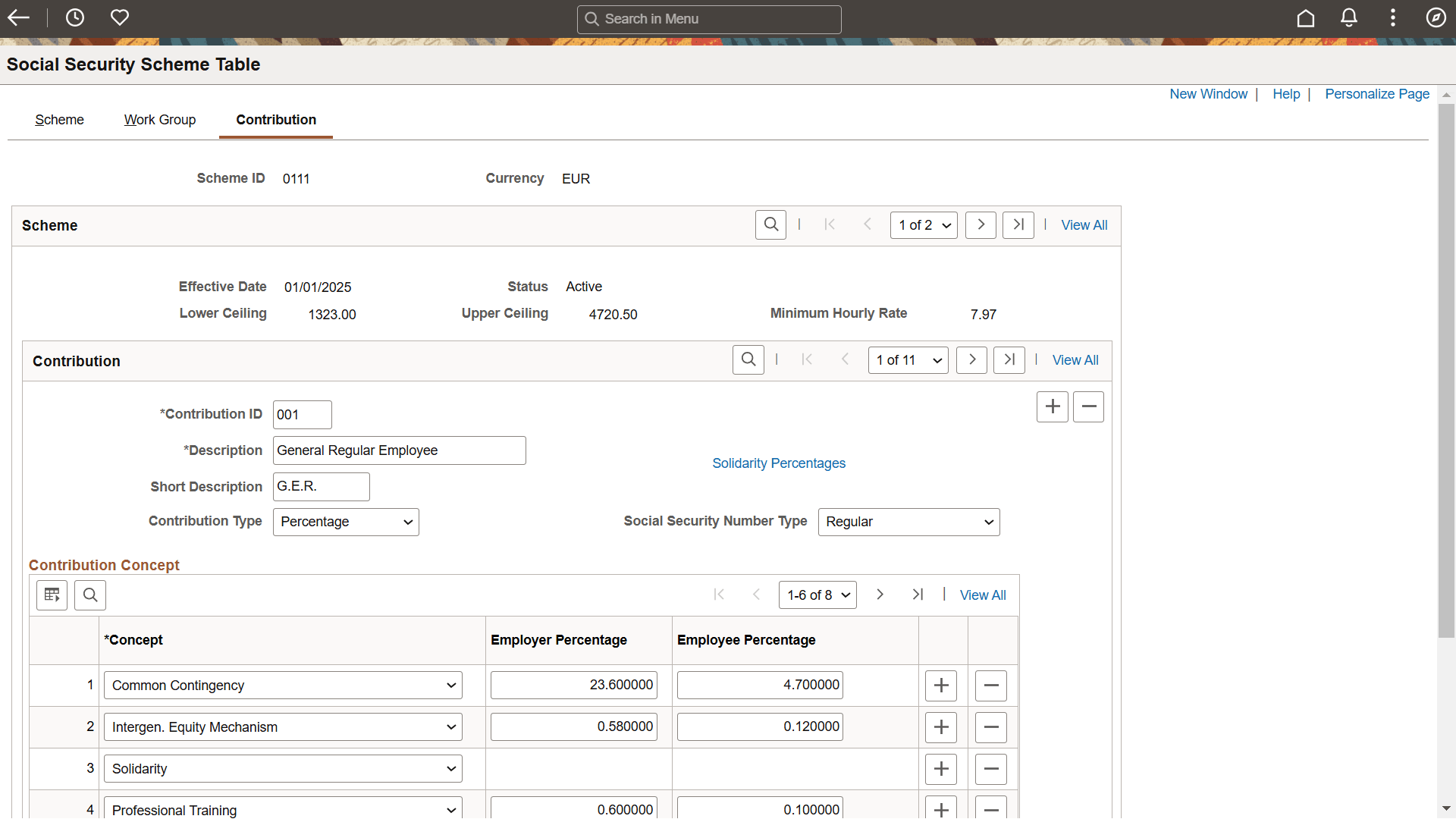
If you need to define rates and percentages for schemes other than the general scheme, you can do so on this page.
| Field or Control | Description |
|---|---|
|
Contribution ID |
In PeopleSoft Global Payroll for Spain, there are multiple contribution IDs for each scheme ID, and each contribution ID is associated with its own rates and percentages. To view the different contribution ID classes and their corresponding rates or percentages, use the scroll arrows in the Contribution and Contribution Concepts scroll areas. Possible values for the contribution ID are:
Note: You must associate individual employees with a Scheme and SS Contribution ID on the Contract Data page. |
|
Social Security Number Type |
Select one of the following values:
|
|
Solidarity Percentages |
Click this link to access the Bracket Data modal window, In the Bracket Data modal window, you can access the definition of the bracket SS BR SOLIDARIDAD, which contains the employee and employer contribution percentages for the Solidarity contribution that is effective from January 2025. For details on fields and explanations on the Bracket Data page, see PeopleSoft Absence Management: Bracket Data Page. |
|
Contribution Type |
Select Percentage if you will be entering percentages in the Employer Percentage or Employee Percentage fields. If you select Percentage, the Employer and Employee Rate fields become unavailable for data entry. Select Rate if you will be entering rates in the Employer or Employee Rate fields. If you select Rate, the Employer and Employee Percentage fields become unavailable for data entry. Important: You should always select Percentage for regular employees, and Rate for apprentices and trainees. |
|
Concept |
Indicates the type of contributions for which the system displays corresponding employee or employer contribution rates or percentages in the Contribution-Concepts grid. Possible values are:
|
|
Employer Rate |
Displays the employer contribution rate associated with the concept listed in the left-hand column of the grid. If you are defining a new rate, enter the rate in this field. Note: Only contributions of apprentices and trainees are based on fixed rates. |
|
Employer Percentage |
Displays the employer contribution percentage associated with the concept listed in the left-hand column of the grid. Social security contributions of regular employees are calculated as percentages of a funding base. If you are defining a new percentage, enter the percentage in this field. |
|
Employee Rate |
Displays the employee contribution rate associated with the concept listed in the left-hand column of the grid. If you are defining a new rate, enter the rate in this field. |
|
Employee Percentage |
Displays the employee contribution percentage associated with the concept listed in the left-hand column of the grid. Social security contributions of regular employees are calculated as percentages of a funding base. If you are defining a new percentage, enter the percentage in this field. |