Tracking Emergency Contacts
This topic discusses how to enter primary address and phone information for emergency contacts.
Pages Used to Track Emergency Contacts
| Page Name | Definition Name | Usage |
|---|---|---|
|
EMERGENCY_CONTACT |
Enter names, addresses, and primary phone information for people to contact in the event of a worker emergency. |
|
|
Other Phone Numbers Page |
EMERGENCY_CONTACT2 |
Record additional phone numbers at which the emergency contact can be reached, such as a work or cellular phone number. |
|
Emergency Contacts Page |
PRCSRUNCNTL |
Generate the Emergency Contacts report (PER004). This report lists all contacts on the Emergency Contact table. Run the Refresh Employees Table process before running this report. |
Emergency Contact Page
Use the Emergency Contact page (EMERGENCY_CONTACT) to enter names, addresses, and primary phone information for people to contact in the event of a worker emergency.
Navigation:
This example illustrates the fields and controls on the Emergency Contact page.
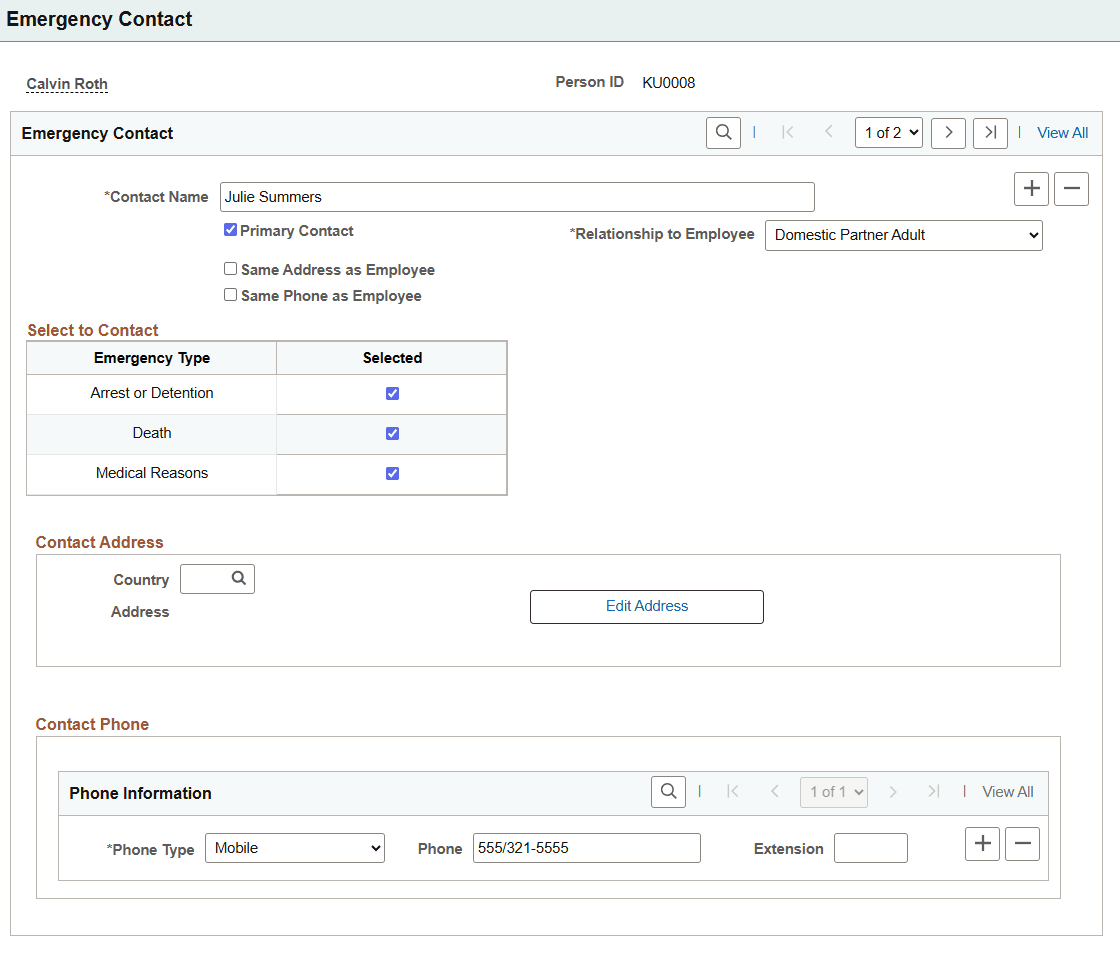
You can view and update information for the various emergency contacts for this worker by using the Add + button or navigation arrows at the top of the page.
| Field or Control | Description |
|---|---|
|
Contact Name |
Enter the name of the emergency contact person. |
|
Primary Contact |
Select if this is the first person whom you should try to contact in an emergency. Select for only one contact. |
|
Relationship to Employee |
Select the option that indicates the contact's relationship to the worker. |
|
Same Address as Employee and Address Type |
Select if the contact has the same address information as the worker, and then select the worker address type that is the same as this contact's. If selected, you don't need to complete any of the address fields. |
|
Same Phone as Employee and Phone Type |
Select if the contact has the same phone information as the worker, and then select the worker phone type that is the same as the contact's. If selected, you don't need to complete any of the phone fields. An emergency contact can have the same address as the worker but a different phone number. |
Select to Contact
This section is available when Enable Emergency Type Selection is enabled on the Installation Table - HCM Options Page.
| Field or Control | Description |
|---|---|
|
Emergency Type |
This grid lists the critical situations in which you can designate an emergency contact. These translate values include:
|
|
Selected |
Select to indicate that this person should be contacted under the corresponding circumstances. |
Contact Address
The fields in this section are available when the person does not share the same address as the employee.
| Field or Control | Description |
|---|---|
|
Country |
Enter or edit the country for the contact's address. This is required before entering an address. |
|
Edit Address button |
Select to enter or edit the contact's address. |
Contact Phone
The fields in this section are available, even when the person shares the same phone as the employee.
| Field or Control | Description |
|---|---|
|
Phone Type, Phone, and Extension |
Enter the contact's phone type and information. You can add a row of information for each phone type. |
|
Phone |
An additional phone field is visible when an employee already has data in the phone field of the administrator page. |
Employee's Phone
This section appears when the person shares the same phone as the employee and displays the employee's phone number.
Related Topics