Tracking Volunteer Activity
This topic discusses how to enter information on worker volunteer activities.
Page Used to Track Volunteer Activity
| Page Name | Definition Name | Usage |
|---|---|---|
|
VOLUNTEER_ACTIVITY |
Enter information on worker volunteer activities. Track multiple volunteer organizations for workers and multiple start dates with the same organization. |
Volunteer Activities Page
Use the Volunteer Activities page (VOLUNTEER_ACTIVITY) to enter information on worker volunteer activities.
Track multiple volunteer organizations for workers and multiple start dates with the same organization.
Navigation:
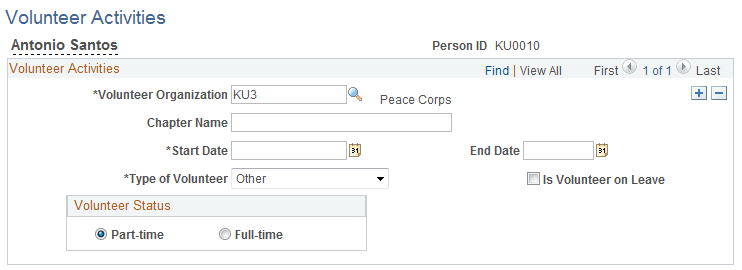
This example illustrates the fields and controls on the Volunteer Activities page. You can find definitions for the fields and controls later on this page.
| Field or Control | Description |
|---|---|
|
Volunteer Organization |
Select a volunteer organization code. |
|
Chapter Name |
Enter the chapter name of the organizations in which the employee volunteers, if applicable. |
|
Start Date andEnd Date |
Enter the start and end date of the worker participation. |
|
Type of Volunteer |
Select the type of volunteer activity in which the worker is participating: Administr, Canvasser, Executive, Fund Raise, or Other. |
|
Is Volunteer on Leave |
Select if the volunteer is on leave. Note: This check box is for informational purposes only. If you select this check box, you don't affect any Monitor Absences business process functionality. |
|
Volunteer Status |
Select either Part Time or Full Time to indicate the volunteer status. |
Note:
This information is useful when you need to track workers' additional skills and knowledge, and when you measure the effectiveness of company-sponsored volunteer and charitable programs.