Transfer Entry with Trees Page
Use the Transfer Entry with Trees page (IDO_XFR_TREE_JPN) to transfer employees between departments using trees.
Navigation:
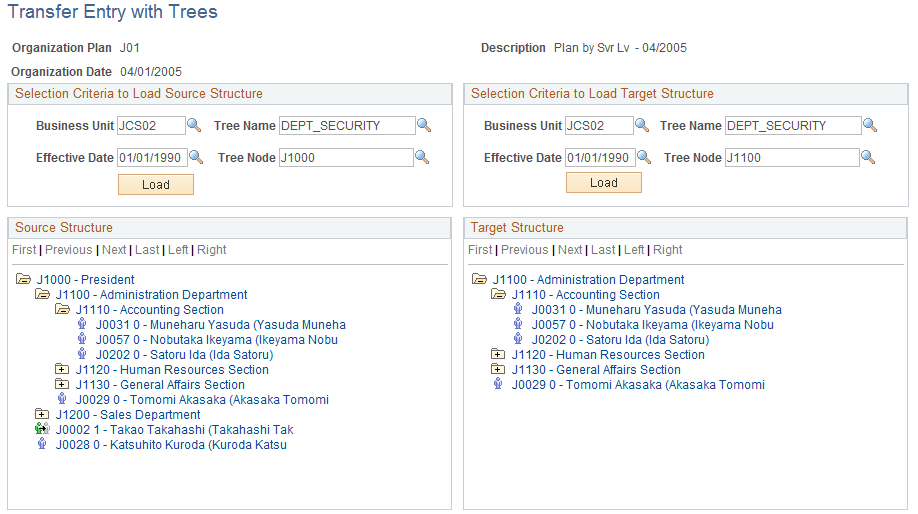
This example illustrates the fields and controls on the Transfer Entry with Trees page (1 of 2). You can find definitions for the fields and controls later on this page.
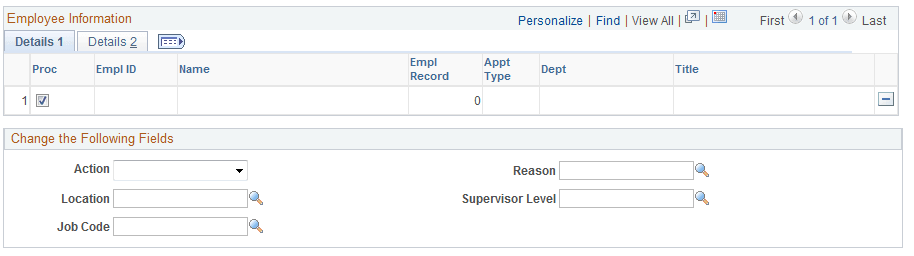
This example illustrates the fields and controls on the Transfer Entry with Trees page (2 of 2). You can find definitions for the fields and controls later on this page.
Note:
Before using this page, consider and decide on each employee's transfer data, including locations, supervisor levels, job codes, and actions and reasons.
Enter values for the Business Unit, Tree Name, Effective Date,and Tree Node fields in both the Selection Criteria to Load Source Structure group box and the Selection Criteria to Load Target Structure group box. Click the respective Load buttons for each section.
To transfer entries by using trees:
-
Select an employee to be transferred from the Selection Criteria to Load Source Structure tree, and click the Department folder to list all employees in the department.
-
Click the employee's name to display information on the Details 1 and Details 2 grids.
-
View information in the Details 1 and Details 2 grids, as necessary.
-
Enter values in the Action and Reason fields.
The Location, Supervisor Level, and Jobcode fields are optional.
-
Click a new department for the employee in the Selection Criteria to Load Target Structure tree.