Understanding the Process Flow for the SINQ Import Process
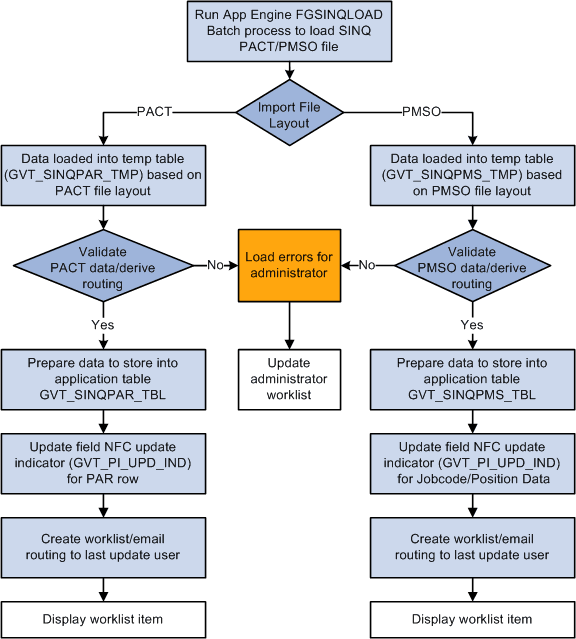
This diagram shows the process flow for the SINQ Import process. The process is similar for PACT and PMSO except that different tables are used. For both PACT and PMSO, the batch process loads data into a temporary table, validates the data, prepares to move the data into an application table, updates the NFC update indicator field, and notifies the last update user:
This table describes the NFC PACT import file layout supported by the SINQ import process. A sample import file, fgnfcpinesinq.dat, is delivered under your product data directory.
| Field Name | Start Position | Length | Field Type | Description |
|---|---|---|---|---|
|
ERR_SSN_NO |
1 |
9 |
Char |
Employee SSN (no dashes) |
|
ERR_SUBAGENCY |
10 |
2 |
Char |
NFC agency (sub) code (that is, 70, 71) |
|
ERR_POI |
12 |
4 |
Char |
Agency Personnel Office Identifier |
|
ERR_COMPANY |
16 |
2 |
Char |
Company Cd |
|
ERR_DOC_TYPE |
18 |
3 |
Char |
NFC doc type (action) |
|
ERR_PAY_PERIOD |
21 |
2 |
Char |
Pay period that action was processed in. |
|
ERR_AUTH_DATE |
23 |
6 |
Num |
Date action was authorized |
|
GVT_STATUS_TYPE |
29 |
3 |
Char |
NFC nature of action code (denotes correction or cancellation of action) CAN = 001, COR = 002 |
|
GVT_NOA_CODE |
32 |
3 |
Char |
NFC nature of action code (type of action) |
|
ERR_EFFDT |
35 |
6 |
Num |
Date action was effective (month) |
|
ERR_BATCH_NO |
41 |
4 |
Char |
NFC batch processing identifier |
|
ERR_OPER_CODE |
45 |
7 |
Char |
HR specialist (id) submitting the action |
|
ERR_CODE |
52 |
3 |
Char |
NFC error code |
|
ERR_MSG |
55 |
50 |
Char |
NFC error message |
This table describes the NFC PMSO import file layout supported by the SINQ import process. A sample import file, fgnfcpmsosinq.dat, is delivered under your product data directory.
| Field Name | Start Posn | Length | Field Type | Description |
|---|---|---|---|---|
|
SUSP_OPER_CD |
1 |
7 |
Char |
HR specialist (id) submitting the action |
|
SUSP_MAST_INDV |
8 |
4 |
Char |
"MSTR" if job code action / "INDV" if position action |
|
SUSP_FUNCTION_CD |
12 |
10 |
Char |
Type of action performed (for example, CHANGE, ADD, and so forth) |
|
SUSP_COMPANY |
22 |
2 |
Char |
Company Cd |
|
SUSP_SUBAGCY |
24 |
2 |
Char |
NFC agency (sub) code (for example, 70, 71, and so forth) |
|
SUSP_POI |
26 |
4 |
Char |
Agency Personnel Office Identifier Example: POI 1536 for Smithsonian |
|
SUSP_JOBCODE |
30 |
6 |
Num |
Jobcode |
|
SUSP_GRADE |
36 |
2 |
Num |
Pay grade level of position/job code |
|
SUSP_POSITION_NBR |
38 |
8 |
Num |
Position Number |
|
SUSP_INCUM-SSN |
46 |
9 |
Char |
SSN of current or last employee holding position |
|
SUSP_OBLIG-SSN |
55 |
9 |
Char |
SSN of new hire employee filling position |
|
SUSP_PAY_PERIOD |
64 |
2 |
Num |
Pay period that action was processed in |
|
SUSP_PASS_NUM |
66 |
2 |
Num |
NFC processing sequence within pay period (1, 2, 3, and so forth) |
|
SUSP_ERR_CD |
68 |
3 |
Num |
NFC error code |
|
SUSP_ERR_MSG |
71 |
50 |
Char |
NFC error message |
|
SUSP_ELEM_NAME_NUM |
121 |
3 |
Char |
NFC element number (record field location) where error detected |
|
SUSP_ELEM_NAME |
124 |
30 |
Char |
NFC element name (record field location) where error detected |
|
SUSP_DATA_FIELD |
154 |
8 |
Char |
NFC element content (field value) where error detected |
Supported Document Types
PeopleSoft delivers and supports four document types that correspond to the types of data imported during the SINQ Import process. The delivered document types are listed in this table:
| NFC Document Type | Description |
|---|---|
|
063 |
Personnel Action |
|
110 |
Award |
|
112 |
Cash Award |
|
123 |
Education |
System administrators can filter any of these NFC document types when they run the SINQ Import process.