Understanding the Process Flow for SINQ Transactions
The SINQ Import process generates a worklist entry and an email message. The recipient uses the worklist entry to access a list of all PACT or PMSO assigned work entries. Clicking a work entry routes the user to the component where the work is to be performed.
The following diagram illustrates the process of using the worklist notification to access first the list of work entries and subsequently the components where the work is to be performed:
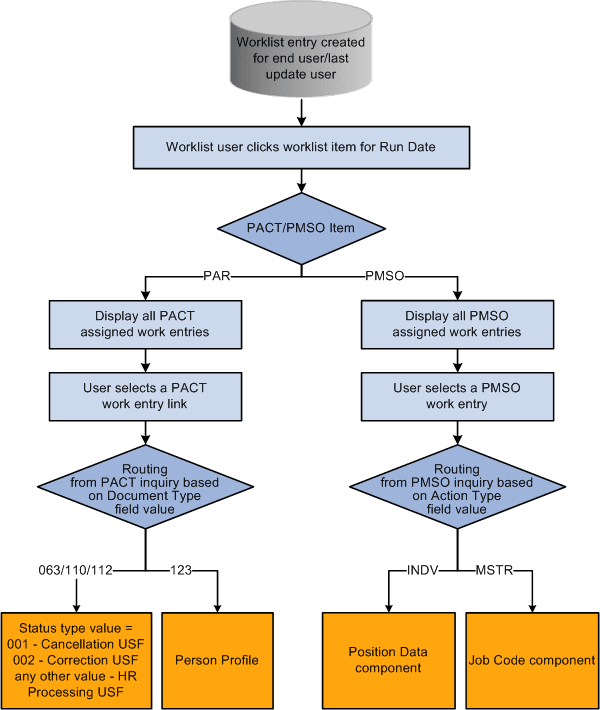
When a user selects an assigned work entry for a PACT SINQ row, the page that is displayed depends on the NFC document type and the status type values. If the NFC document type is 063 (Personnel action), 110 (Award action) or 112 (Education), the pages that are displayed are:
-
If the Status type value equals 001, the Cancel Personnel Action USF (EE_CANCELLATION) component is displayed.
-
If the Status type value equals 002, the Correct Personnel Action USF (EE_CORRECTION) component is displayed.
-
If the Status type value equals blank or any other value, HR Processing USF (EE_HR_PROC) component is displayed.
See Understanding the Administering PAR System.
If the NFC document type is 123, the Person Profile component is displayed.
See PeopleSoft Human Resources Manage Profiles: Person Profile Page.
When a user select an assigned work entry for a PMSO SINQ row:
-
If Action type field value is INDV, the Position Data component is displayed.
-
If Action type field value is MSTR, the Job Code component is displayed.
See PeopleSoft Human Resources Manage Positions: Creating Positions, Application Fundamentals: Classifying Jobs.