(USF) Defining Award Actions
To set up the (USF) Award Actions tables, use the Award Actions (GVT_AWD_ACTN), and Award Type Table (RUN_FGPER810) components.
This topic discusses how to set up award actions.
Pages Used to Define Award Actions
| Page Name | Definition Name | Usage |
|---|---|---|
|
GVT_AWD_ACTN |
Define award codes for monetary and nonmonetary awards types. |
|
|
Award Type Table Page |
PRCSRUNCNTL |
Run the Award Type table report (FGPER810). |
Award Actions Page
Use the Award Actions page (GVT_AWD_ACTN) to define award codes for monetary and nonmonetary awards types.
Navigation:
This example illustrates the fields and controls on the Award Actions page. You can find definitions for the fields and controls later on this page.
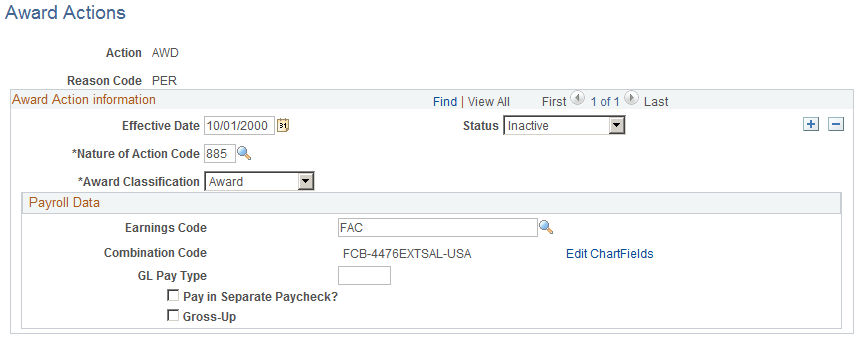
| Field or Control | Description |
|---|---|
|
Nature of Action Code |
Enter the reason associated with this award action. |
|
Award Classification |
Select the award classification, either Award or Bonus. |
|
Award Code |
Enter the NFC-defined code that identifies the bonus or award. The entry in this field becomes the default value on the Award Data page for this action reason and is read only. |
Payroll Data
| Field or Control | Description |
|---|---|
|
Earnings Code |
Select an earnings code to associate with this award action. |
|
Combination Code andEdit ChartFields |
Displays the key that defines a combination of ChartFields. Click the Edit ChartFields link to access the ChartFields Details page. |
|
GL Pay Type (general ledger pay type) |
Select the pay type to associate with this award action. |
|
Pay in Separate Paycheck? |
Select if this award action should be paid in a separate check. |
|
Gross-Up |
Select to indicate the award or bonus amount must be grossed-up for payroll purposes. |
NFC Populate Amount Indicator
| Field or Control | Description |
|---|---|
|
Not Applicable orPopulate Amount |
The default selection is Not Applicable. Select Populate Amount to define a relocation or recruiting bonus that is granted to an employee though a personnel action:
Note: These fields are not visible to the user. |
Related Topics