Adjusting the FSA Carryover Amount
This topic describes how to adjust the FSA carryover amount.
The FSA carryover amount will have to be adjusted in the following scenarios:
-
For Base Benefits customers who do not use FSA Administration but want to keep a record of the carryover amount.
-
During the first year of an employee using FSA Administration and has a carryover amount being brought in from a third party system.
-
An employee needs to transfer a carryover amount from a different plan.
-
For claim adjustment for history FSA Plan Years which affects the carryover amount.
Page Used to Adjust the FSA Carryover Amount
| Page Name | Definition Name | Usage |
|---|---|---|
|
|
Adjust the FSA carryover amount. |
Spending Account Adjustment Page
Use the Spending Account Adjustment page to adjust FSA carryover amount.
Navigation:
Benefits > Enroll in Benefits > Spending Account Adjustment > Spending Account Adjustment
This example illustrates the fields and controls on the Spending Account Adjustment page. You can find definitions for the fields and controls later on this page.
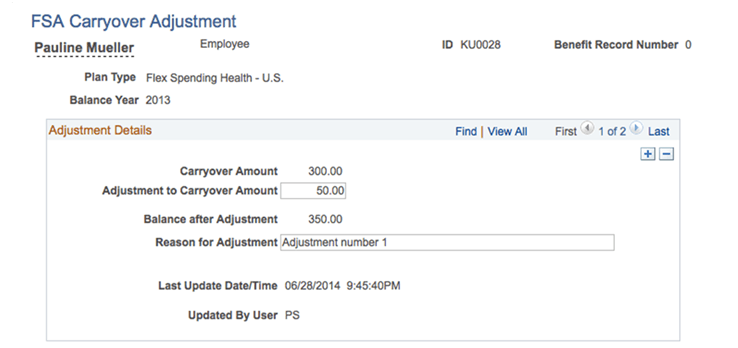
| Field or Control | Description |
|---|---|
|
Adjustment to Carryover Amount |
Enter the FSA carryover adjustment amount. |
|
Balance after Adjustment |
View the adjusted carryover balance. |
Note:
FSA carryover adjustment can be done only for the earliest open plan year. The adjusted current carryover balance will be displayed on the Year-to-Date Activity page of the earliest open plan year in the Carryover Balance field, and on the Year-to-Date Activity page of the following year under the Carryover Amount from Prior Year field.