Create ACA XML Files Page
Use the Create ACA XML Files page (ACA_RUN_BAC020) to generate the ACA transmittal file(s) and the PDF version of Form 1095-C.
Navigation:
This example illustrates the fields and controls on the Create ACA XML Files page.
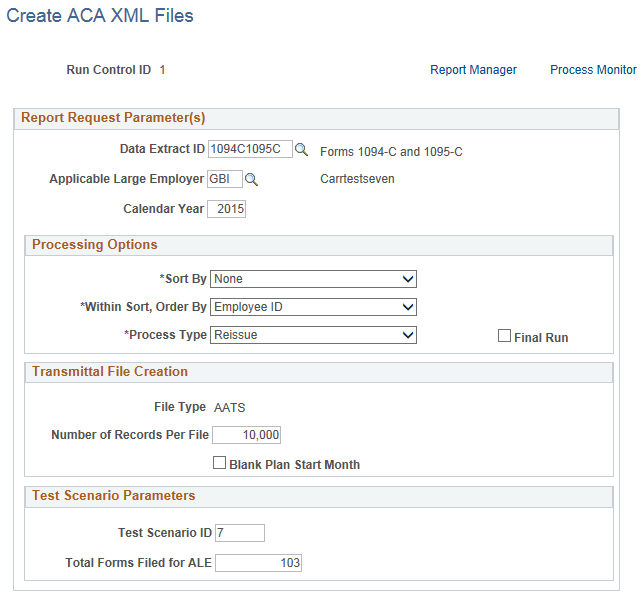
| Field or Control | Description |
|---|---|
|
Data Extract ID |
Enter the Data Extract ID that was used to run the data extract. Data extracted using this rule will be used to generate the transmittal file(s) and the PDF forms. |
|
Applicable Large Employer |
The Applicable Large Employer for which data is being reported. |
|
Calendar Year |
The calendar year for which data is being reported. |
|
Sort By |
First sort option of the employees being reported. |
|
Within Sort, Order By |
Second sort option within the Sort By option, of the employees being processed. |
|
Process Type |
The options available are:
|
|
Final Run |
Select this check box to process the final run. For a preliminary run (when the Final Run checkbox is not selected), the Request file will be generated with a temporary file name. No Manifest file will be generated. Only the Benefits Administrator can view Form 1095-C records which are created in a preliminary run. For the final run, the Request file will be generated with the file name specified by the IRS. The Manifest file will be generated. Form 1095-C records which are created in the final run will be available for viewing in Self Service. Note: Perform Final Run only when the preliminary runs have been satisfactory and results have been verified. Once Final Run is processed for selected ALE employer and ACA employee data, the same data cannot be reprocessed in a subsequent Final Run. An exception to this is before the transmittal files from the Final Run have been transmitted to IRS and the reissue of Form 1095-C is required. In which case, new sequenced data can be added to prepare the employee data for reissue. |
|
File Type |
Displays the File Type selection on the ACA Transmittal Parameters page. |
|
Number of Records Per File |
Each file transmitted to the IRS must not exceed the 100MB file size limit imposed by the IRS. If the submission is larger than 100MB, it must be split into two or more separate file transmissions. The default Number of Records Per File is set at the ACA Transmittal Parameters page. Note: If the generated file exceeds 100MB during preliminary runs, reduce the number of records and re-generate the files. |
|
Blank Plan Start Month |
Select to print blank Plan Start Month on Form 1095-C and to omit the data element equivalent in the transmittal file. This option is only visible when Calendar Year is 2015, when reporting of Plan Start Month is optional. |
|
Test Scenario ID |
Enter the number of a test scenario as prescribed by IRS. |
|
Total Form Filed for ALE |
Enter Total Form Filed for ALE that corresponds to the Test Scenario ID selected. |
Note:
Test Scenario Parameters group box is only visible when the File Type is “AATS”.
The following files are created when the Create ACA XML Files process (Job ACA1095C) is run with the Final Run checkbox deselected:
-
PREXMIT<TCC><Date>T<TimeStamp>Z.xml,
where <TCC> is the TCC code of the ALE Member, <Date> and <TimeStamp> are the date/time of when the file was created. This is a preliminary transmittal file that should not be submitted to IRS. The date in the file name is in the YYYYMMDD format.
-
ACA95C15_EE.pdf. The print file of 1095C PDF forms to be sent to employees.
-
ACA95C15_ES.pdf. The Self-Service 1095C PDF form for an employee that can be viewed by an employee via Self-Service who has given his/her consent on or before the Self Service Availability date of the ACA form.
The following files are created when the Create ACA XML Files process (Job ACA1095C) is run with the Final Run check box selected:
-
1094C_Manifest_<Submission>__<TCC>_<Date>T<TimeStamp>Z.xml, where <Submission> is the Submission ID of the transmittal file, <TCC> is the TCC code of the ALE Member, <Date> and <TimeStamp> are the date/time of when the file was created.
-
1094C_Request_<TCC>_<Date>T<TimeStamp>Z.xml, and PREXMIT<TCC><YYYYMMDD>T<TimeStamp>Z.xml,
where <TCC> is the TCC code of the ALE Member, <Date> and <TimeStamp> are the date/time of when the file was created. The Manifest and Request files, as a set of files, can be transmitted to the IRS using the AIR UI Channel.
-
ACA95C15_EE.pdf. The print file of 1095C PDF forms to be sent to employees.
-
ACA95C15_ES.pdf. The Self-Service 1095C PDF form for an employee that can be viewed by an employee via Self-Service who has given his/her consent on or before the Self Service Availability date of the ACA form.