ACA Form BI Publisher Options Page
Each filing year, Forms 1095-C and the Instructions for Form 1095-C may change. When these change, the PeopleSoft delivered XML templates will also change correspondingly. An annual parameter setup page is required to keep track of these templates and the location of where the form data items are stored.
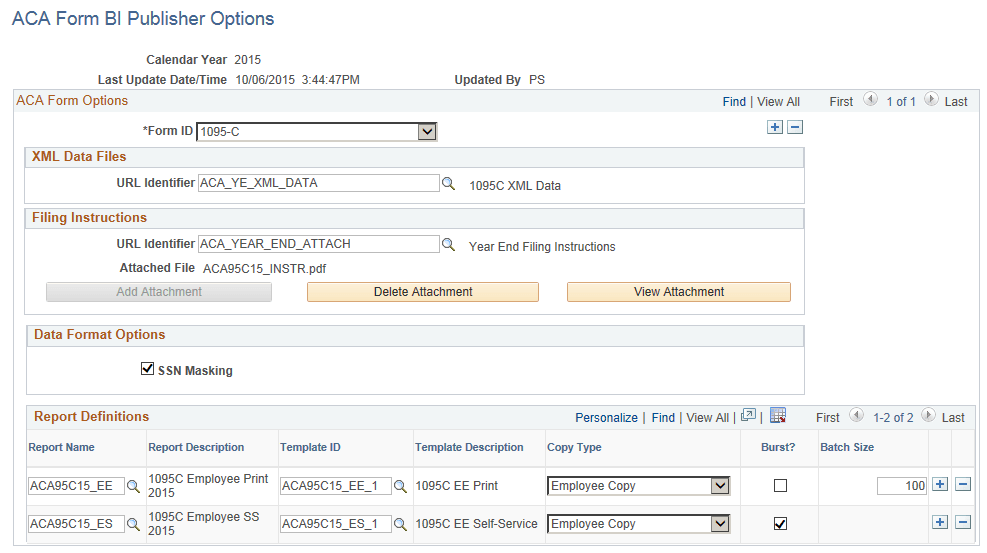
Use the ACA Form BI Publisher Options page (ACA_YE_XMLP_OPTION) to define the annual parameters of the Form 1095-C XML.
Navigation:
This example illustrates the fields and controls on the ACA Form BI Publisher Options page.
| Field or Control | Description |
|---|---|
|
Calendar Year |
The year for which data is to be reported. |
|
Form ID |
The valid Form ID is 1095-C. |
|
XML Data Files: URL Identifier |
Define a URL address to store the filing data. |
|
Filing Instructions:URL Identifier |
Define a URL address to store the filing instructions that correspond to the forms for the year for which data is to be reported. |
|
Filing Instructions:Attached File |
Displays the filename of the filing instructions for the filing year for which data is to be reported. |
|
SSN Masking |
Select the SSN Masking checkbox to turn on the masking option. On Form 1095-C statements furnished to employees, the Social Security Number can be truncated to show only the last four digits of the SSN and replace the first five digits with Xs. By default the masking option is turned on (i.e. checkbox selected). |
|
Report Name |
The Report Name identifies each form option for Form 1095-C. Three form options are supported for 2015 reporting:
Note: Replace ACA95C15_EE with ACA95C15_SM if you choose to use pressure-seal form instead of cut-sheet. |
|
Template ID |
The Template ID is used in conjunction with Report Name; each Report Name has a corresponding Template ID:
|
|
Copy Type |
There is only one copy type: Employee Copy. |
|
Burst? |
Select this checkbox to indicate that the report is using the bursting feature. Bursting key is defined in BI publisher Report Definition setup. |
|
Batch Size |
Batch Size is used for printing hardcopy forms. The user can control how many employees are to be printed in each PDF file. The default is blank, meaning that forms for all employees will be generated in one PDF file. Note: There is a file size limitation on BI Publisher. If the PDF file is too big, it cannot be opened up for printing. A batch size field is included on the options pages to define the size of each print file in order to group the forms into smaller batches for printing. |