Defining the Installation Settings for Base Benefits
To set up implementation defaults for Base Benefits, use the Benefits Installation (INSTALLATION_BN) component.
This topic describes the Benefits installation component. Other system-wide implementation defaults are set on the installation (INSTALLATION_TBL) component for Human Resources. See Application Fundamentals: Setting Up Implementation Defaults in your PeopleSoft HCM Application Fundamentals product documentation. Also consult your PeopleSoft Human Resources installation product documentation.
Pages Used to Define Benefits Installation Settings
| Page Name | Definition Name | Usage |
|---|---|---|
|
INSTALLATION_BN |
Defines system-wide Benefits installation settings. Note: The settings given here are in addition to the settings on pages in the Installation (INSTALLATION_TBL) component for HR. |
Benefits Installation Page
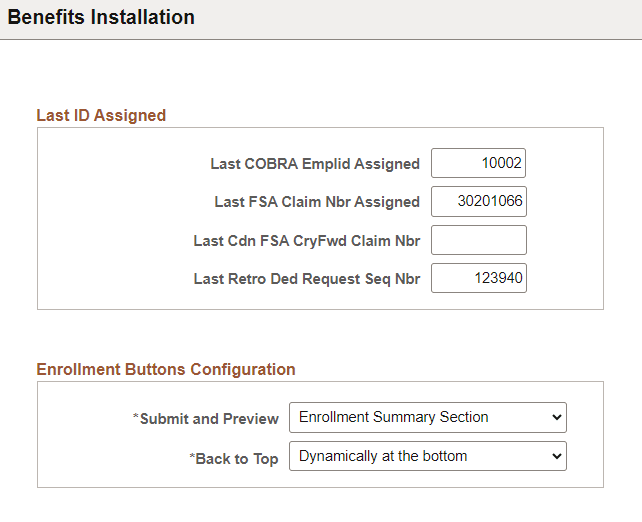
Use the Benefits Installation page (INSTALLATION_BN) to define system-wide Benefits settings.
Note:
The settings given here are in addition to the settings on the pages in the Installation (INSTALLATION_TBL) component for HR.
Navigation:
This example illustrates the fields and controls on the Benefits Installation page.
Note:
Enrollment Buttons Configuration applies only to Benefits Administration.
| Field or Control | Description |
|---|---|
|
Submit and Preview |
Select to configure the location where the Submit and Preview Statement buttons are displayed on the Benefits Enrollment page. Available options are Bottom of the page, Enrollment Summary Section, and Upper right side of the page. |
|
Back to Top |
Select option to configure the display of the Back to Top button in the Benefits Enrollment page. Available options are Dynamically at the bottom, and Do not display. |
Related Topics