Generating HIPAA Certificates
Note:
With the Affordable Care Act, HIPAA Certificates have become obsolete, and effective 1/1/2015, they are no longer required.
This section discusses how to generate a HIPAA Certificate and view HIPAA letter printing dates.
Pages Used to Generate HIPAA Certificates
| Page Name | Definition Name | Usage |
|---|---|---|
|
RUN_CNTL_HIPAA |
Run the report of the history of a former employee's group health coverage. |
|
|
BENEF_LETTER_HIST |
View HIPAA certificate printing for an employee and dependents. |
HIPAA Compliance Report Page
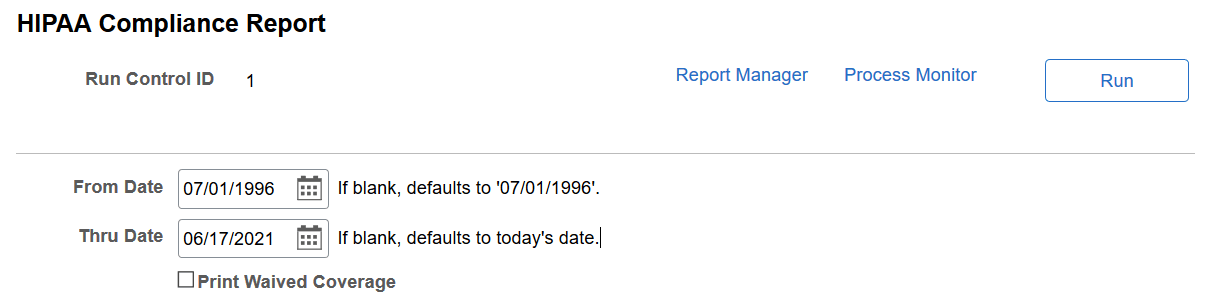
Use the HIPAA Compliance Report page (RUN_CNTL_HIPAA) to run the report of the history of a former employee's group health coverage.
Navigation:
This example illustrates the fields and controls on the HIPAA Compliance Report page. You can find definitions for the fields and controls later on this page.
| Field or Control | Description |
|---|---|
|
From Date |
Enter the beginning date of the time period for which you want to generate HIPAA certificates. |
|
Thru Date |
Enter the ending date of the time period for which you want to generate HIPAA certificates. |
Notification Letters Page
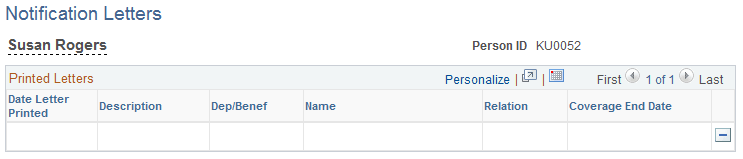
Use the Notification Letters page (BENEF_LETTER_HIST) to view HIPAA certificate printing for an employee and dependents.
Navigation:
This example illustrates the fields and controls on the Notification Letters page. You can find definitions for the fields and controls later on this page.