Life and AD/D Plan Table Page
Use the Life and AD/D Plan Table page (LIFE_ADD_TABLE) to enter life or AD/D plan details.
Navigation:
This example illustrates the fields and controls on the Life and AD/D Plan Table page. You can find definitions for the fields and controls later on this page.
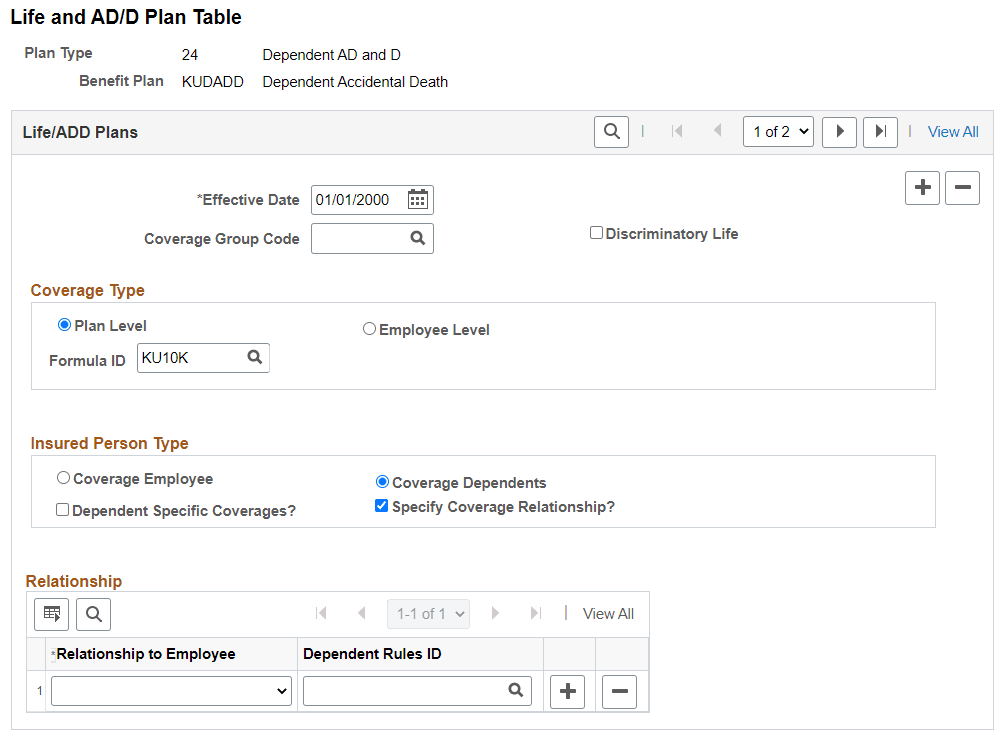
Life/ADD Plans
| Field or Control | Description |
|---|---|
|
Coverage Group Code |
(Optional) Enables you to define a maximum benefit amount for a group of life and AD/D plan types. Coverage group codes are defined on the Life and AD/D Coverage Groups page. You might do this if employees can choose more than one life plan type—perhaps life and AD/D—but the total benefit for the combined plans cannot exceed a specific amount. The coverage group code maximum applies to all the life and AD/D benefit plans that you associate with a coverage group code and one benefit program. |
|
Discriminatory Life |
Select this field for the system not to deduct any coverage amounts from the U.S. imputed income calculation. |
Coverage Type
| Field or Control | Description |
|---|---|
|
Plan Level |
Select to indicate that coverage for this plan is determined by a specific formula ID. |
|
Employee Level |
Select to indicate that coverage for this plan is specified by the flat amount on the enrollment page. |
|
Formula ID |
Select from the available coverage formula IDs. |
Insured Person Type
| Field or Control | Description |
|---|---|
|
Employee |
Select to indicate that the person insured by this plan is the employee. On the enrollment page, this directs the system to collect beneficiary allocations. |
|
Dependents |
Select to indicate that the persons insured by this plan are the employee's dependents and not the employee. On the enrollment page, this directs the system to collect a list of covered individuals. |
|
Dependent Specific Coverages? |
Select the check box to indicate that each covered dependent will have an individual coverage amount entered for him or her on the enrollment page. If this check box is not selected, then a single coverage amount is specified and each covered person receives this same amount of coverage. |
|
Specify Coverage Relationship? |
Select the check box to specify if the coverage should be based on the dependent's age, and relationship with the employee. If this check box is selected, then a Relationship grid displays below. If this check box is not selected, then all the dependents are eligible for coverage. |
|
Relationship to Employee |
Select the relationship of the covered dependents with the employee. |
|
Dependent Rules ID |
Select the dependent rule for validating the dependents during the enrollment to this plan type. You can enter different dependent rules for your relationships. For more information on defining dependent rules, see Setting Up Dependent Rules for Health Plans. The dependent validation also depends on the event rules defined in PeopleSoft Benefits Administration: Event Rules Table – Event Rules Page. |
Restricting Insurance Coverage
You can associate coverage formulas that include coverage minimum and maximum amounts with a life benefit program and benefit plan combination. When you do this, the system verifies that coverage for participants doesn't exceed those minimums and maximums, regardless of the coverage that you enter on the Life and AD/D Plan table. This enables you to restrict the amount of coverage for an individual life plan.
You can use the Coverage Group Code page to also restrict the amount of coverage across all life insurance plans in which the employee enrolls. For example, you define a coverage group code with a 500,000 USD maximum, then enter that coverage group code for a supplemental life plan and a group life plan, and associate both benefit plans with a benefit program. If you enrolled an employee in both of these plans, the system would ensure that the employee's total coverage by both plans does not exceed 500,000 USD.
If the maximum is exceeded, the system reduces the total coverage to meet the coverage maximum. When the system processes deductions, it accumulates the coverage amounts and begins reducing coverage when the coverage group maximum is reached. The system processes plans in order of deduction priority. If more than one plan has the same priority, it processes in increasing plan type order.