Managing COBRA Benefit Plan and Dependent Information
This section describes how to manage COBRA benefit plan and dependent information.
Pages Used to Manage COBRA Benefit Plan and Dependent Information
| Page Name | Definition Name | Usage |
|---|---|---|
|
COBRA_PROG_PARTIC1 |
Change benefit program participation for Open Enrollment and Family Status Change events. |
|
|
COBRA Health Plan Enrollment |
COBRA_HEALTH1 |
View or update health plan elections and enroll dependents. |
|
COBRA_FSA |
View or update FSA enrollments. |
|
|
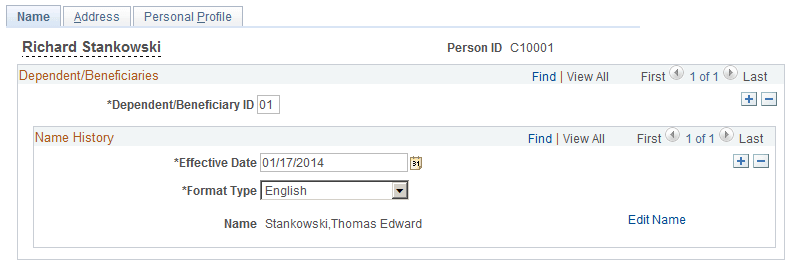
COBRA_DEP_BENEF1 |
Add or Update COBRA dependent/beneficiary information. |
|
|
Address |
COBRA_DEP_ADDR |
Enter or update COBRA dependent address information. |
|
Personal Profile |
COBRA_DEP_BENEF2 |
Enter or update COBRA dependent details. |
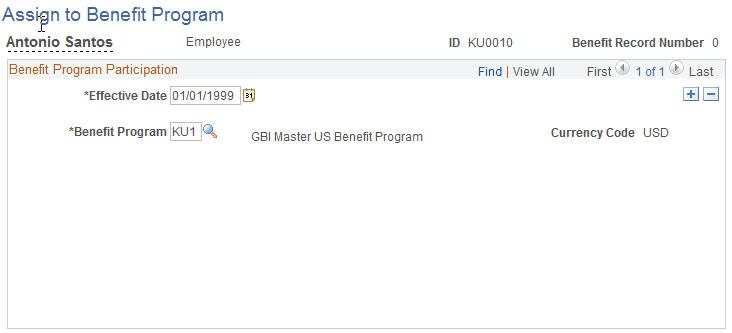
Assign COBRA Benefit Program Page
Use the Assign COBRA Benefit Program page (COBRA_PROG_PARTIC1) to change benefit program participation for Open Enrollment and Family Status Change events.
Navigation:
This example illustrates the fields and controls on the Assign COBRA Benefit Program page. You can find definitions for the fields and controls later on this page.
Health Plan Enrollment Page
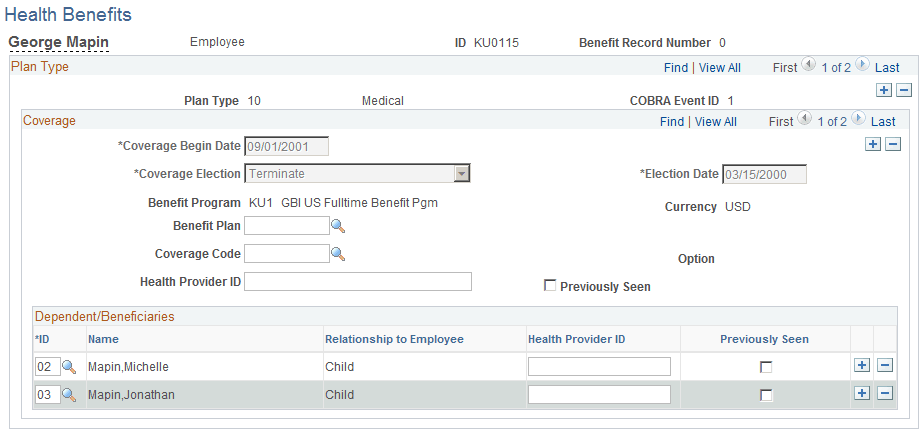
Use the Health Plan Enrollment page (COBRA_HEALTH1) to view or update health plan elections and enroll dependents.
Navigation:
This example illustrates the fields and controls on the Health Plan Enrollment page. You can find definitions for the fields and controls later on this page.
| Field or Control | Description |
|---|---|
|
Coverage Begin Date |
Automatically set to the date in the Review Event Summary page. |
|
Coverage Election |
Displays whether the COBRA health benefit record in view is currently elected or terminated. |
|
Coverage Code |
When you exit this field, the system calculates the monthly cost of the benefit. |
|
Health Provider ID |
Enter the name of the employee's doctor, an ID number, or any other information that the health provider may require. |
|
Previously Seen |
Indicate that the employee is a current patient of the indicated physician. This field becomes available when a health provider ID is entered. |
|
HIPAA Report Date (Emp) (Health Insurance Portability and Accountability Act report date [employee]) |
Displays the date that the employee's certificate of creditable health coverage was printed if health coverage was terminated. These certificates are guaranteed to employees by HIPAA of 1996; you can print them by running HIPAA reports. Note: The certificate of creditable coverage lists all group health coverage that an employee had for the 18 month period prior to the date on which coverage ended. |
Dependent/Beneficiaries
| Field or Control | Description |
|---|---|
|
ID |
Select a dependent ID to add available beneficiaries to the selected COBRA plan. |
|
Health Provider ID |
Enter the name of the dependent's doctor, an ID number, or any other information that the health provider may require. |
|
Previously Seen |
Select to indicate that the dependent is a current patient of the indicated physician. This check box becomes available when a health provider ID is entered. |
COBRA FSA Plan Enrollment Page
Use the COBRA FSA Plan Enrollment (flexible spending account benefits) page (COBRA_FSA) to view or update FSA enrollments.
Navigation:
This example illustrates the fields and controls on the COBRA FSA Plan Enrollment page. You can find definitions for the fields and controls later on this page.
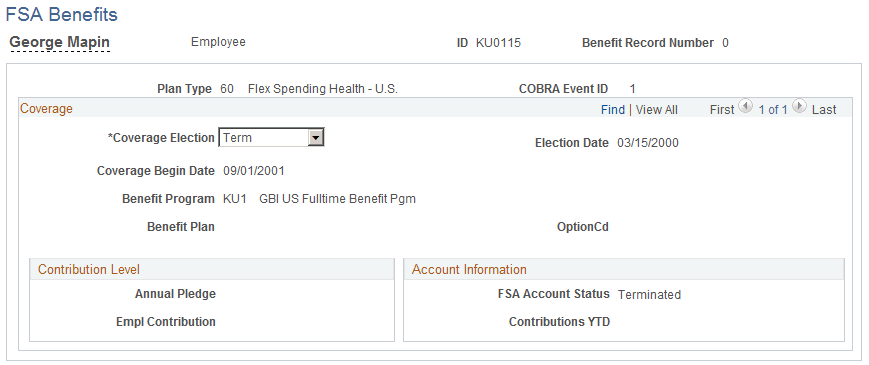
Use the Coverage Election field to view and change whether the displayed COBRA FSA plan is elected or terminated.