Setting Up Health Plans
To set up health plans, use the Health Plan Table (HEALTH_PLAN_TABLE) component.
This section discusses how to enter health plan details.
Page Used to Set Up Health Plans
| Page Name | Definition Name | Usage |
|---|---|---|
|
HEALTH_PLAN_TABLE |
Enter health plan details. |
Health Plan Table Page
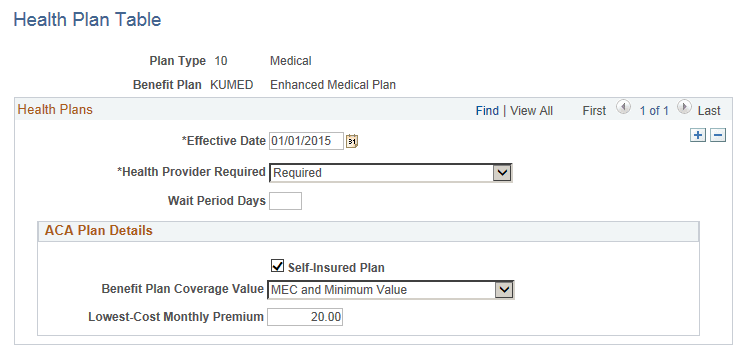
Use the Health Plan Table page (HEALTH_PLAN_TABLE) to enter health plan details.
Navigation:
This example illustrates the fields and controls on the Health Plan Table page. You can find definitions for the fields and controls later on this page.
| Field or Control | Description |
|---|---|
|
Health Provider Required |
Select whether an employee must declare a health provider when enrolling in this plan through self-service. |
|
Wait Period Days |
Enter the number of days an employee must wait to be eligible for the plan. |
|
Self-Insured Plan |
Select this check box if the health plan is employer-sponsored self-insured health coverage. |
|
Benefit Plan Coverage Value |
Options include MEC and Minimum Value, MEC and Not Minimum Value, and Not Minimum Essential Coverage. |
|
Lowest-Cost Monthly premium |
This cost is the employee share of the lowest-cost monthly premium for self-only minimum essential coverage providing minimum value that is offered to the employee. (This field is only used for employees using the Base Benefits product.) |