Updating Benefits Certifications
This section discusses how to update employee benefit certifications.
Page Used to Edit Benefits Certifications
| Page Name | Definition Name | Usage |
|---|---|---|
|
BN_CERTIF_PARTC |
Updating employee benefit certifications. |
Maintain Benefit Certification Page
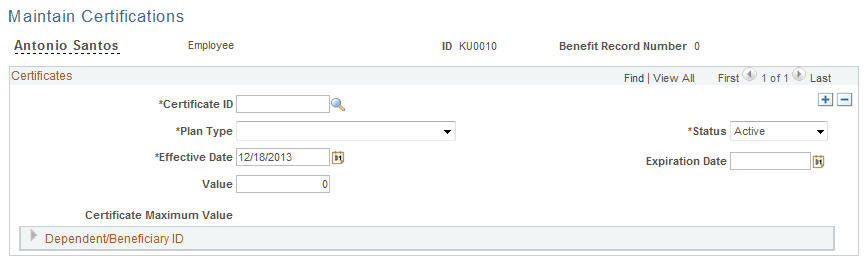
Use the Maintain Benefit Certification page (BN_CERTIF_PARTC) to updating employee benefit certifications.
Navigation:
This example illustrates the fields and controls on the Maintain Benefit Certification page. You can find definitions for the fields and controls later on this page.
| Field or Control | Description |
|---|---|
|
Certificate ID |
Enter the ID that represents a certificate created in the Certification Definition page. |
|
Status |
Select Active or Inactive. |
|
Plan Type |
Select from all available plan types for a participant's assigned benefit program with an associated certificate. |
|
Effective Date |
A date the system uses to calculate the length of time from this initial start date of a certificate. |
|
Expiration Date |
An informational field that you can use to enter the expiration date of the certificate. |
|
Value |
Enter the minimum value to allow to consider the certificate as complete or valid. |
|
Certificate Maximum Value |
Displays the maximum value of the certificate as defined in the Certificate Definition. |
|
Dependent/Beneficiary ID |
Select from all available dependents or beneficiaries for the participant. |