Copying Matrices
This section discusses how to copy configurable matrices.
Page Used to Copy Configurable Matrices
| Page Name | Definition Name | Usage |
|---|---|---|
|
WCS_LK_TBL_CLONE |
Copy matrices. |
Copy Configurable Matrix Page
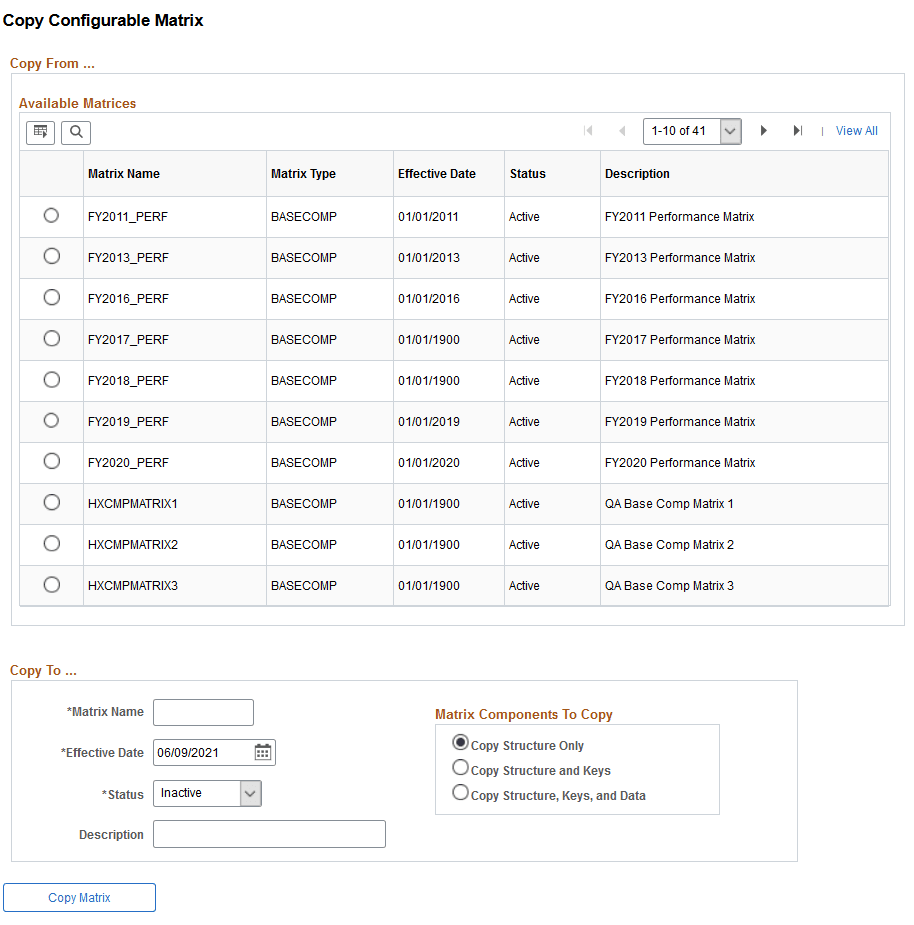
Use the Copy Configurable Matrix page (WCS_LK_TBL_CLONE) to copy matrices.
Navigation:
This example illustrates the fields and controls on the Copy Configurable Matrix page.
To copy a matrix:
-
Select the matrix that you want to copy from the Available Matrices grid.
-
In the Copy To group box, enter values in the Matrix Name, Effective Date, Status, and Description fields for the new matrix.
Note:
The default status is Inactive, but you can change it to Active. However, if the source matrix is Inactive, then you cannot change the copy status to Active.
-
In the Matrix Components To Copy group box:
-
Select Copy Structure Only to include just matrix details, input and output definitions.
-
Select Copy Structure and Keys to include the structure plus all search key values for every input.
-
Select Copy Structure, Keys, and Data to clone the entire matrix.
-
-
Click the Copy Matrix button to create the copy.
You will get a confirmation message and then see a new link labeled “Edit New Matrix <<matrix name>>”. Click this link to begin editing the new matrix.