Defining Position Pools
To define position pools, use the Position Pool Table component (POOL_TBL).
Use the Position Pool Table page (POOL_TBL) to set up valid position pool IDs. Position pools enable you to establish groups of positions for budgeting purposes. You can then attach budget information and encumbrance calculation rules to specific position pools. Once you've set up position pool IDs, attach positions to position pools using the Position Pool ID field on the Position Data − Specific Information page (POSITION_DATA5). For example, if you want to budget for your implementation-related positions together, create an implementation team position pool ID on the Position Pool Table. Then attach this ID to each implementation-related position on the Position Data-Specific Information page.
Note:
Position pools can't span departments. Each position in a position pool must be in the same department.
Page Used to Define Position Pools
| Page Name | Definition Name | Usage |
|---|---|---|
|
POOL_TBL |
Set up position pool IDs. |
Position Pool Table Page
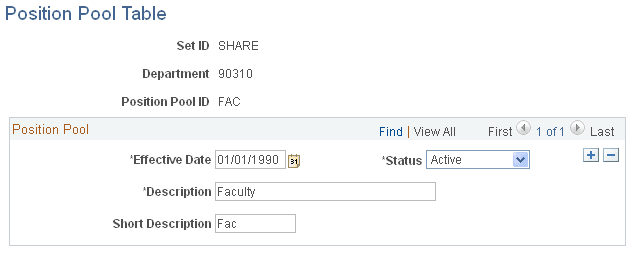
Use the Position Pool Table page (POOL_TBL) to set up position pool IDs.
Navigation:
This example illustrates the fields and controls on the Position Pool Table page.
| Field or Control | Description |
|---|---|
|
Position Pool ID |
Identifies a position pool. Assign positions to a position pool on the Position Data component (POSITION_DATA) and then set up budgets for position pools using the Commitment Accounting business process. |