Running FTE Reports
Pages Used to Run the FTE Reports
| Page Name | Definition Name | Usage |
|---|---|---|
|
RUNCTL_FRMTHRU_DPT |
Run a Department FTE (department full time equivalent) report (BUD001), which captures the difference between full time equivalent caps and FTE actuals for each department. |
|
|
RUNCTL_BUD012 |
Run an FTE Rollup report (BUD012), which provides a detailed listing of total filled and vacant FTE (full time equivalent) counts by department. |
Department FTE Report Page
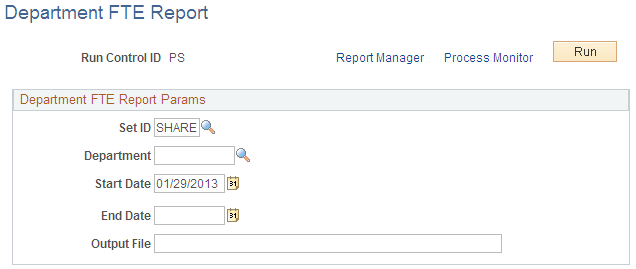
Use the Department FTE Report page (RUNCTL_FRMTHRU_DPT) to run a Department FTE (department full time equivalent) report (BUD001), which captures the difference between full time equivalent caps and FTE actuals for each department.
Navigation:
This example illustrates the fields and controls on the Department FTE Report page.
| Field or Control | Description |
|---|---|
|
Output File |
Enter the file name you want the system to write the FTE budget data to. |
Full-Time Equivalent Roll-Up Page
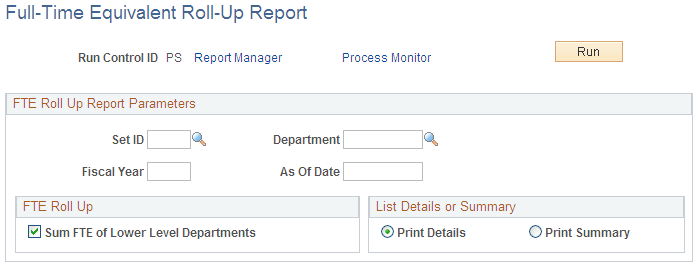
Use the Full-Time Equivalent Roll-Up page (RUNCTL_BUD012) to run an FTE Rollup report (BUD012), which provides a detailed listing of total filled and vacant FTE (full time equivalent) counts by department.
Navigation:
This example illustrates the fields and controls on the Full-Time Equivalent Roll-Up Report page.
| Field or Control | Description |
|---|---|
|
Sum FTE of lower level departments |
Select if you want the system to roll up the FTE counts of the departments that are part of the Department you selected. |
|
List Details or Summary |
Select if you want the FTE Rollup report to list Summary or Details information. |