Calculating Employee Ratings
After the employees have been identified, the reviewer evaluates those who are to be rated and assigns a temporary rating. Now you need to calculate an adjustment constant to account for differences between reviewers and calculate the final rating.
This section discusses how to calculate employee ratings.
Pages Used to Calculate Employee Ratings
| Page Name | Definition Name | Usage |
|---|---|---|
|
RUNCTL_FPA025 |
Run the Assessment Statuses SQR report (FPA025) that lists selected employees and whether they have been rated. Use this report to determine which employees have not been rated. |
|
|
RUNCTL_FPA030 |
Run the Adjustment constant calcul. (adjustment constant calculation) SQR report (FPA030). This report calculates the adjustment constant for each reviewer for one or more corps. |
|
|
RUNCTL_FPA035 |
Calculate the final rating. |
|
|
Review Rating Prcs Rlts FPS (review rating process results) Page |
FPA_FINRA_RSL_T_PNL |
View the final rating results. |
Review Evaluation Status FPS Page
Use the Review Evaluation Status FPS page (RUNCTL_FPA025) to run the Assessment Statuses SQR report (FPA025) that lists selected employees and whether they have been rated.
Use this report to determine which employees have not been rated.
Navigation:
This example illustrates the fields and controls on the Review Evaluation Status FPS page. You can find definitions for the fields and controls later on this page.
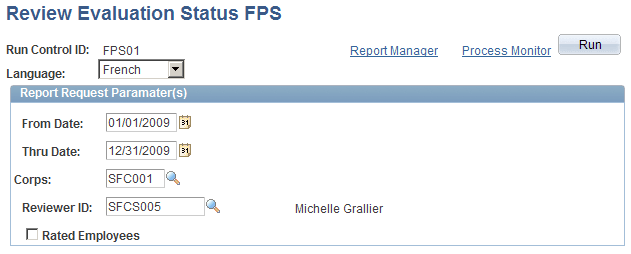
| Field or Control | Description |
|---|---|
|
From Date and Thru Date |
Select the rating period. |
|
Corps |
Select a corps to include only employees of that corps or leave the field blank to include all corps. |
|
Reviewer ID |
Select a reviewer to have the report contain only the employees assigned to this reviewer. Leave the field blank to include employees assigned to all reviewers. |
|
Rated Employees |
Select to have the report list employees who have been rated. Leave the check box deselected to have the report list employees who have not been rated. |
Calc Adjustment Constant FPS Page
Use the Calc Adjustment Constant FPS (calculate adjustment constant) page (RUNCTL_FPA030) to run the Adjustment constant calcul.
(adjustment constant calculation) SQR report (FPA030). This report calculates the adjustment constant for each reviewer for one or more corps.
Navigation:
This example illustrates the fields and controls on the Calc Adjustment Constant FPS page. You can find definitions for the fields and controls later on this page.
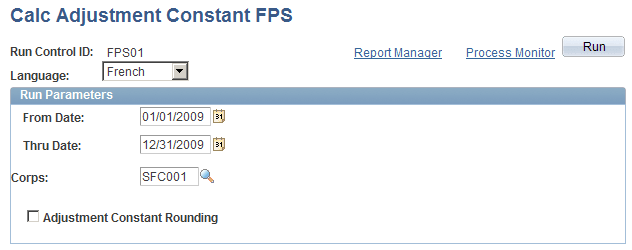
| Field or Control | Description |
|---|---|
|
From Date and Thru Date |
Select the rating period. |
|
Corps |
Select a corps if you want to calculate the adjustment constant for that corps only. Leave the field blank to calculate the adjustment constant for all corps. |
|
Adjustment Constant Rounding |
Select to have the adjustment constant rounded to a multiple of .25 (for example, 1.25, 1.50, or 1.75). |
The system calculates an adjustment constant to normalize the ratings of the various reviewers. The Adjustment Constant report (FPA030) shows evaluation details such as the average rating, number of points by corps, and points by reviewer. The system calculates an adjustment constant for each reviewer—the average of the total points minus the average of the reviewer's points.
Create Final Rating FPS Page
Use the Create Final Rating FPS page (RUNCTL_FPA035) to calculate the final rating.
Navigation:
The Final Rating process (HR_FPFIRA_CI) applies the adjustment constant to the temporary rating to give the employee a final score.
For each employee, the final rating overrides the initial rating. The effective date is December 31; the initial rating is stored in an archive record.