Managing Absences
This section discusses how to track an employee's absences.
Pages Used to Manage Absences
| Page Name | Definition Name | Usage |
|---|---|---|
|
Absences - Overall Data Page |
FPAEEABSENCE_PNL1 |
Add an absence action. |
|
FPAEEABSENCE_PNL2 |
Track an employee's absences. |
Absences Page
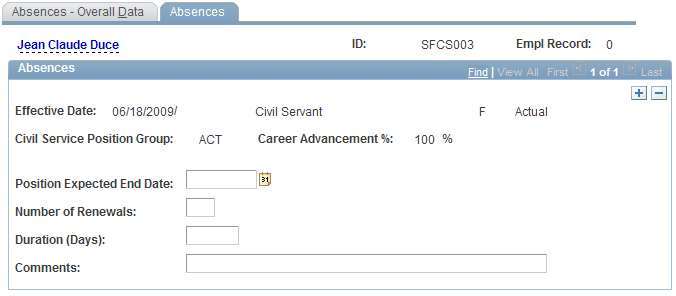
Use the Absences page (FPAEEABSENCE_PNL2) to track an employee's absences.
Navigation:
This example illustrates the fields and controls on the Absences page. You can find definitions for the fields and controls later on this page.
There is no interaction between the Civil Service Position business process and Absences. An absence that is selected in the Civil Service Position business process is not automatically retrieved in Absences, or vice versa. These two business processes are independent.
To track absences:
-
Enter a date in the Position Expected End Date field.
Depending on the action and its setup, this field can be required or optional.
-
Enter the number of renewals (repeated absences) and the duration of the absence in days.
-
If necessary, enter a comment.