Setting Up Host Organizations
When employees are on external secondment, they are moved to an organization that is selected from a predetermined list. To avoid redundant data and make your search easier, two levels of organization classification are suggested. They are Type of organization and Subtype of organization.
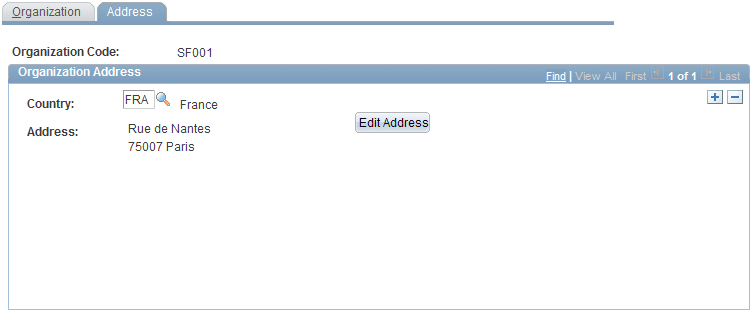
To set up organizations, use these components: Type of Organization (FPMORGTYPE_PNL), Sub-types of Organization (FPMORG_PNL), and Organizations (FPMINDBTORG_PNL). This section discusses how to add or change an organization.
Pages Used to Set Up Host Organizations
| Page Name | Definition Name | Usage |
|---|---|---|
|
FPMORGTYPE_PNL |
Add or change an organization type. |
|
|
FPMORG_PNL |
Add or change an organization subtype. |
|
|
FPMINDBTORG_PNL1 |
Add or change an organization. |
|
|
FPMINDBTORG_PNL2 |
Enter an organization's address. |
Type of Organization Page
Use the Type of Organization page (FPMORGTYPE_PNL) to add or change an organization type.
Navigation:
This example illustrates the fields and controls on the Type of Organization page. You can find definitions for the fields and controls later on this page.

Enter a description and short description of the organization type.
Sub-types of Organization Page
Use the Sub-types of Organization page (FPMORG_PNL) to add or change an organization subtype.
Navigation:
This example illustrates the fields and controls on the Sub-types of Organization page. You can find definitions for the fields and controls later on this page.

Enter a description and short description of the organization sub-type.
Organization Page
Use the Organization page (FPMINDBTORG_PNL1) to add or change an organization.
Navigation:
This example illustrates the fields and controls on the Organization page. You can find definitions for the fields and controls later on this page.
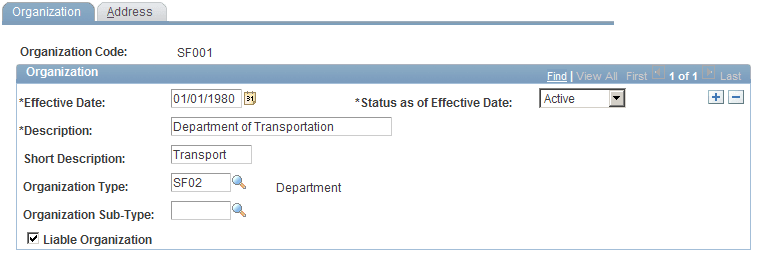
| Field or Control | Description |
|---|---|
|
Organization Type |
Select an organization type. |
|
Organization Sub-Type |
The available values depend on the organization type. |
|
Liable Organization |
Select to indicate that the organization is liable for the "employer" civil pension contribution. |