(USF) Setting Up Unions
To set up U.S. Federal Government union and contract information use the Unions USF component (GVT_BU_UNION).
Use the Unions USF to define codes and record data for unions to which agency workers belong. You or others in your agency might need information on union workers for collective bargaining agreement negotiations, grievance tracking, or pay step increases.
This topic discusses how to set up union data in US Federal implementations.
Pages Used to Set Up U.S. Federal Government Union and Contract Information
| Page Name | Definition Name | Usage |
|---|---|---|
|
GVT_BU_UNION_TBL1 |
Enter general details and address information for a union. |
|
|
GVT_BU_UNION_SEC1 |
Enter the address information for this union. |
|
|
GVT_BU_UNION_SEC2 |
Enter contact and contract details for this bargaining unit. The contact information is specific to the contract. |
|
|
GVT_BU_UNION_TBL2 |
Enter contact information that is general for all contracts with this union. |
|
|
GVT_BU_UNION_TBL3 |
Enter partnership and steward data for this bargaining unit. |
|
|
GVT_BU_UNION_TBL4 |
Enter additional contract terms for this bargaining unit. |
|
|
GVT_BU_UNION_TBL5 |
Enter allowable earnings codes data for bargaining unit members. |
Union Address Page
Use the Union Address page (GVT_BU_UNION_TBL1) to enter general details and address information for a union.
Navigation:
This example illustrates the Union Address page.
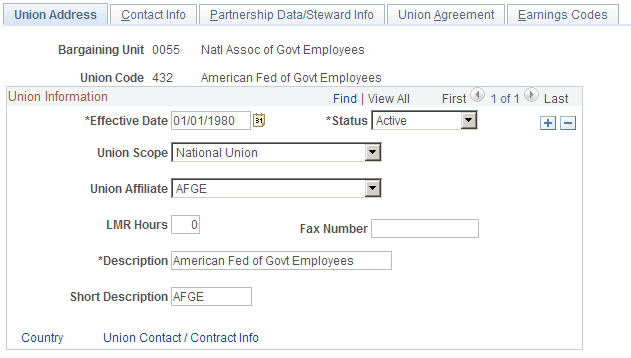
Assign union codes to workers on the Job Data - Job Labor page.
See PeopleSoft Human Resources Administer Workforce: Job Labor Page.
| Field or Control | Description |
|---|---|
|
Union Scope |
Enter the union scope (local, national, worldwide). |
|
Union Affiliate |
Enter the union affiliate type. |
|
LMR Hours (labor management relations hours) |
Enter the labor management relations training hours required for union members or other personnel, if you want to track this information. |
|
Country |
To enter the union's address information, click this link. The system displays the Union Address Information page. |
|
Union Contact / Contract Info |
To enter the bargaining unit's contact and contract information, click this link. The Contact and Contract Info page appears. |
Union Address Information Page
Use the Union Address Information page (GVT_BU_UNION_SEC1) to enter the address information for this union.
Navigation:
Click the Country link on the Union Address page.
This example illustrates the Union Address Information page.
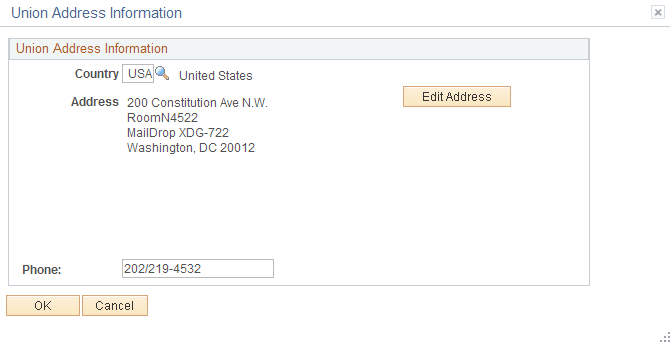
Select the appropriate country and enter the address information. If the address is already entered, click the Edit Address link to display the Edit Address Information page.
Contact and Contract Info Page
Use the Contact and Contract Info page (GVT_BU_UNION_SEC2) to enter contact and contract details for this bargaining unit.
The contact information is specific to the contract.
Navigation:
Click the Union Contact / Contract Info link on the Union Address page.
This example illustrates the Contact and Contract Info page.
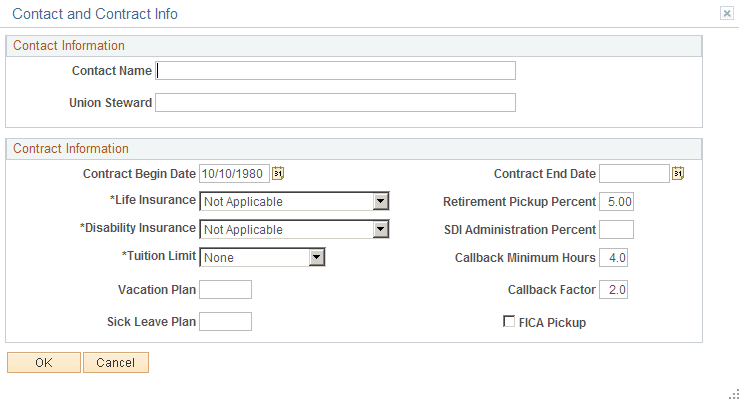
Contact Information
Enter contact information that is specific for the contract.
Contract Information
| Field or Control | Description |
|---|---|
|
Disability Insurance |
Specify the amount the disability insurance offered bargaining unit members. |
|
Retirement Pickup Percent |
Enter the retirement pickup percent for bargaining unit members' retirement plan under the contract. |
|
Tuition Limit |
Indicate the maximum amount of tuition provided each bargaining unit member, if any. |
|
SDI Administration Percent (state disability insurance administration percent) |
Enter the percent amount paid to the state disability insurance. |
|
Callback Factor |
Enter the rate at which bargaining unit members should be paid if they are called to a job. For example, if the worker should be paid at the regular rate, enter 1 as the factor. Or if the employee should be paid time and a half, enter 1.5. |
Contact Info Page
Use the Contact Info page (GVT_BU_UNION_TBL2) to enter contact information that is general for all contracts with this union.
Navigation:
This example illustrates the Contact Info page.
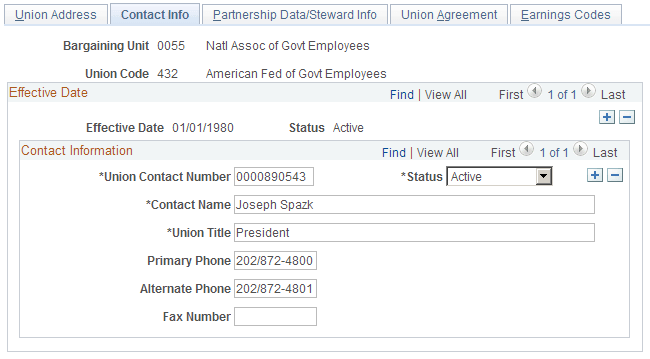
Add contact information that is general for the union bargaining unit.
Partnership Data/Steward Info Page
Use the Partnership Data/Steward Info page (GVT_BU_UNION_TBL3) to enter partnership and steward data for this bargaining unit.
Navigation:
This example illustrates the Partnership Data/Steward Info page.
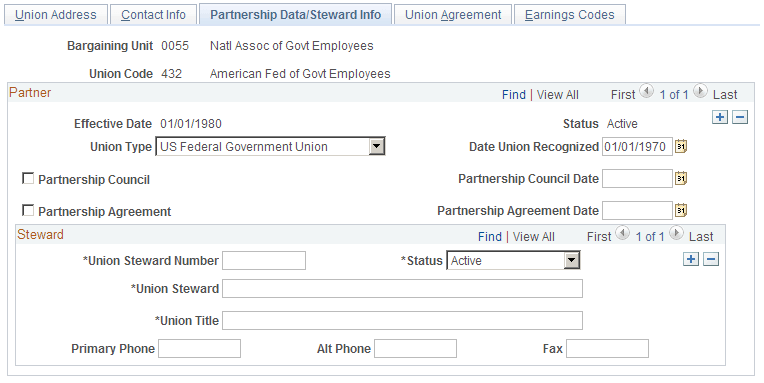
Partner
| Field or Control | Description |
|---|---|
|
Union Type |
Indicate whether this bargaining unit is part of a private, public, or federal government union. |
|
Date Union Recognized |
Enter the date the union was recognized by your agency. |
Union Agreement Page
Use the Union Agreement page (GVT_BU_UNION_TBL4) to enter additional contract terms for this bargaining unit.
Navigation:
This example illustrates the Union Agreement page.
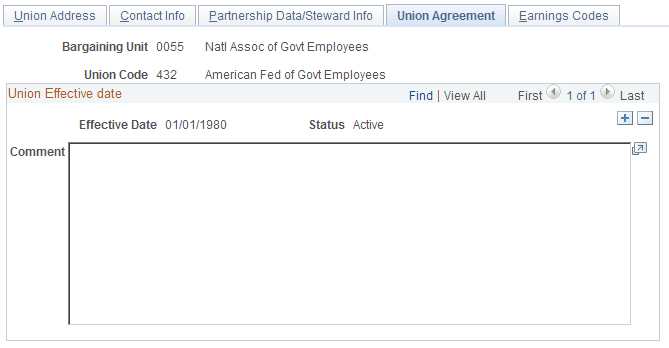
Type highlights of the union agreement in the space provided for bargaining unit/union agreement text. Enter more text than is visible in the group box, if needed. Use the inner scroll bar to navigate to text off of the screen.
Earnings Codes Page
Use the Earnings Codes page (GVT_BU_UNION_TBL5) to enter allowable earnings codes data for bargaining unit members.
Navigation:
This example illustrates the Earnings Codes page.
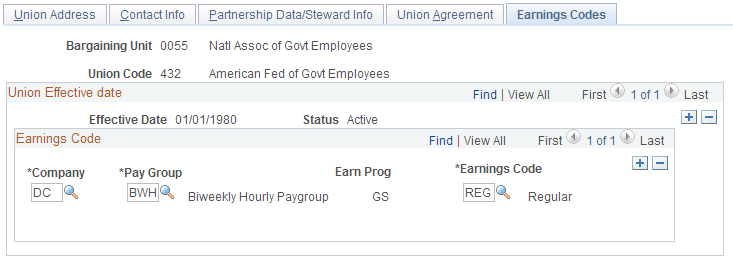
Note:
The information on this page is for information only.
| Field or Control | Description |
|---|---|
|
Company |
Designate the company name. |
|
Pay Group, Earn Prog (pay group, earnings program) |
Select the pay group. When you move out of this field, the system displays the associated earnings program. |
|
Earnings Code |
Select each earnings code that is valid for this union within each pay group. |