(USF) Setting Up Position Titles
To set up position titles, use the Official Position Titles USF (GVT_PSN_TTL_TBL) and the Organizational Posn Titles USF (GVT_ORG_PSN_TTL) components.
These topics discuss how to set up position titles.
Note:
An official position title is the title of a position that is in accordance with the Office of Personnel Management (OPM) position classification standards. An organizational position title is the unofficial title that is given to a position based on how your agency is organized and where the position fits in the organization.
Pages Used to Set Up Position Titles
| Page Name | Definition Name | Usage |
|---|---|---|
|
Official Position Titles USF Page |
GVT_PSN_TTL_TBL |
Set up official position titles that will later be associated with positions. Before using the page, set up Occupation Series classifications. |
|
GVT_ORG_PSN_TTL |
Set up organization position titles that will later be associated with positions. Before using the page, set up Occupation Series classifications. |
Official Position Titles Page
Use the Official Position Titles page (GVT_PSN_TTL_TBL) to set up official position titles that will later be associated with positions.
Before using the page, set up Occupation Series classifications.
Navigation:
This example illustrates the fields and controls on the Official Position Titles page. You can find definitions for the fields and controls later on this page.
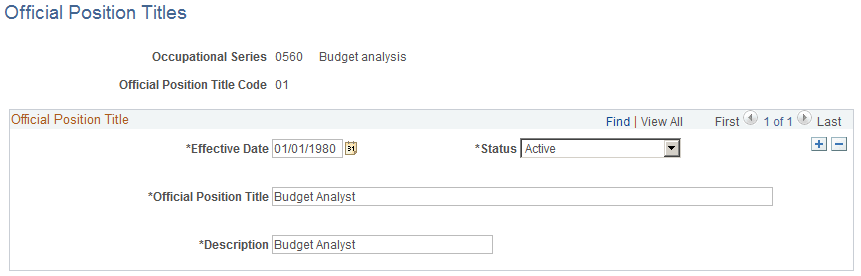
If you are adding a new position title code you must first select an occupational series and enter an official position title code. After you access this page enter an official positional title and description.
| Field or Control | Description |
|---|---|
|
Official Position Title and Description |
Enter a title and description of the position. If you leave these fields blank and later select a job code on the Job Information page, these fields will display the title and description associated with that job code. You can override the default value. This information appears on the incumbent's Employment record. As such, this information should be updated to reflect that the position title, short title, and long description are always overwritten with the Job Code's values when changing a position's job code. |
Organizational Position Title Page
Use the Organizational Posn Titles USF page (GVT_ORG_PSN_TTL) to set up organization position titles that will later be associated with positions.
Before using the page, set up Occupation Series classifications.
Navigation:
Follow the same instructions for non-USF position titles.