Observing Regulated Individuals
This topic provides an overview of observing regulated individuals and discusses how to:
Pages Used to Set Up Observation Elements and Observe Regulated Individuals
| Page Name | Definition Name | Usage |
|---|---|---|
|
PCMP_OBS_ELEM |
Define observation elements. |
|
|
PCMP_OBS_MODEL |
Construct observation models. |
|
|
PCMP_OBS_MODEL2 |
Add observation elements to models. |
|
|
PCMP_RI_OBS |
Enter observations of a regulated individual. |
|
|
PCMP_RI_OBS2 |
Enter observation details. |
|
|
RI Observation (regulated individual observation) |
RUN_CNTL_PCMP3 |
Use the RI Observation report (PCMP003) to collect complete details of a regulated individual's observation. |
Understanding Regulated Individual Observations
Unlike reviews, observations are not linked to development plans, so it is not necessary to define a plan before you can observe a regulated individual. However, you must perform several setup steps before you can enter observation data. After you have completed these setup steps, you can enter observations, review observation histories, and generate observation reports.
To perform observations:
-
(Setup) Define observation elements using the Review Rank Change Request MIL or Elements page.
Observation elements are the individual activities that you want to observe. After being defined, these observation elements can be reused and combined in different ways to create observation models, such as the ones discussed in steps 2 and 3.
-
(Setup) Enter a name and description for the observation model that you are creating on the Observation Model page.
An observation model organizes individual observation elements into a process or procedure that regulated individuals may be required to follow. For example, a financial advisor may be required to inform customers of the charges that might apply when they purchase stock, and then advise them of the known risks of investing in a security before they sell a specific stock. The steps of discussing charges, assessing risks, and selling are part of a process that can be observed and structured as an observation model.
-
(Setup) Add observation elements to the observation model on the Model Elements page.
-
Assign regulated individuals to one of the observation models and enter your observations of regulated individuals in relation to the observation elements that are part of the observation model on the RI Observation (regulated individual observation) and Observation Elements pages.
-
Display the review history of the individual on the RI Observation History page.
-
Generate reports of an worker's observation history to see how they measure against all of the elements of the observation model on the RI Observation Reports page.
Related Topics
Elements Page or Review Rank Change Request MIL Page
Use the Elements page or Review Rank Change Request MIL page (PCMP_OBS_ELEM) to define observation elements.
Navigation:
This example illustrates the fields and controls on the Elements page.
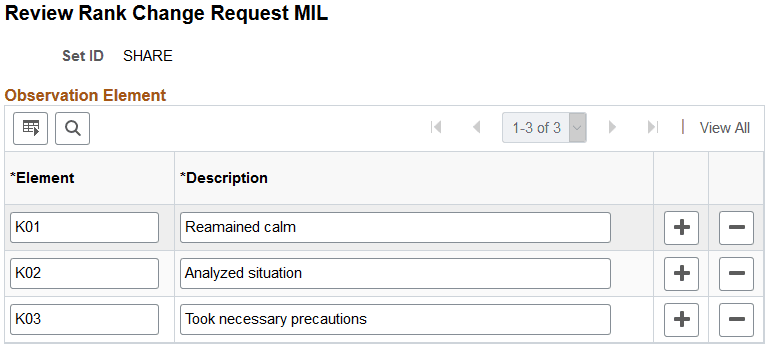
| Field or Control | Description |
|---|---|
|
Element and Description |
Enter name and description for the observation elements that you want to use in the observation model. |
Observation Model Page
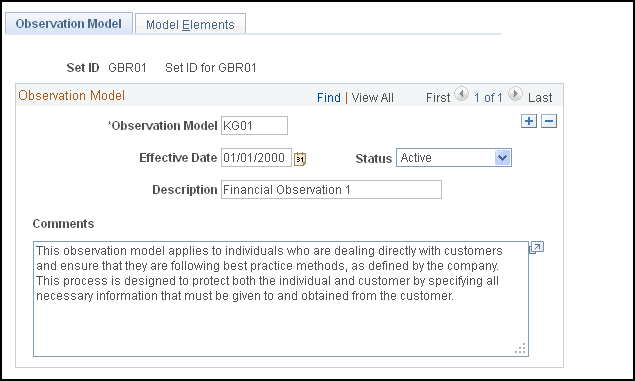
Use the Observation Model page (PCMP_OBS_MODEL) to construct observation models.
Navigation:
This example illustrates the fields and controls on the Observation Model page.
| Field or Control | Description |
|---|---|
|
Observation Model |
Enter name for the observation model. |
|
Comments |
Enter comments about the observation model. |
Model Elements Page
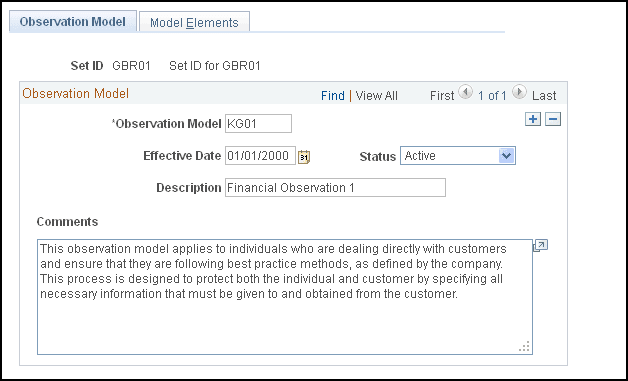
Use the Model Elements page (PCMP_OBS_MODEL2) to add observation elements to models.
Navigation:
This example illustrates the fields and controls on the Model Elements page.
| Field or Control | Description |
|---|---|
|
Observation Element |
Enter the observation elements that you want to include in the observation model. |
|
Required |
Select if the observation element that you specified requires a mandatory "pass" status. |
|
Comments |
Enter comments about the observation elements. |
RI Observation Page
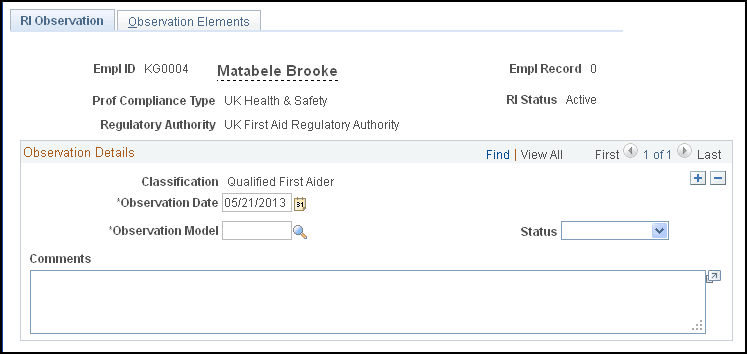
Use the RI Observation (regulated individual observation) page (PCMP_RI_OBS) to enter observations of a regulated individual.
Navigation:
This example illustrates the fields and controls on the RI Observation page.
| Field or Control | Description |
|---|---|
|
Observation Date |
Enter the date on which you perform the observation. |
|
Observation Model |
Enter observation model against which you assess the regulated individual whose employee ID appears at the top of the page. |
|
Status |
Select the general performance status of the regulated individual relative to the observation model. |
|
Comments |
Enter comments about the regulated individual's performance. |
Observation Elements Page
Use the Observation Elements page (PCMP_RI_OBS2) to enter observation details.
Navigation:
This example illustrates the fields and controls on the Observation Elements page.
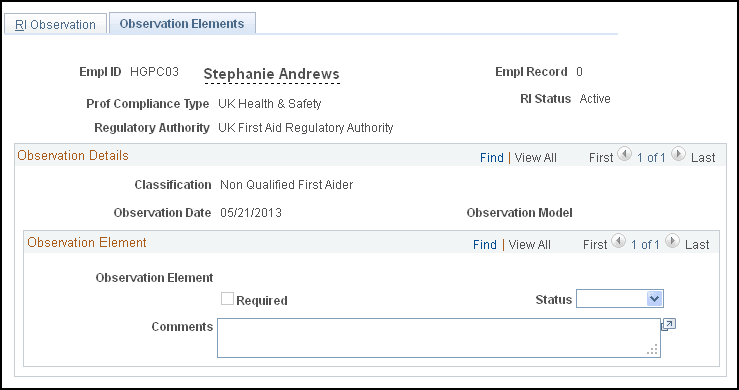
| Field or Control | Description |
|---|---|
|
Observation Element |
Displays the individual activity that you are assessing or observing. |
|
Required |
The system selects this check box if you specified on the Model Elements page that the observation element requires a "pass." |
|
Status |
Select the performance status of the regulated individual relative to the observation element. |
|
Comments |
Enter comments about the regulated individual's performance. |