Setting Up NVQ Information
These topics provide an overview of NVQ setup and discuss how to specify awarding bodies for NVQs.
Pages Used to Set Up NVQ Awarding Bodies
| Page Name | Definition Name | Usage |
|---|---|---|
|
NVQ Award Body Table Page |
NVQ_AWARD_TBL |
Define name and location information for NVQ awarding bodies. |
|
NVQ_DETAILS |
Specifying awarding bodies for NVQs that you have defined in the content catalog. You must set up NVQs and the NVQ Award Body Table values in before you can use this page. |
Understanding NVQ Setup
To track NVQs, you need to define the following:
-
NVQ content items.
-
NVQ unit content items.
-
NVQ Element content items.
NVQ units are divided into elements and you track an employee's progress for each element separately.
-
Awarding bodies.
NVQs, NVQ units, and NVQ elements are stored in the content catalog. Use the following delivered content types for NVQs:
| Content Type | Description |
|---|---|
|
NVQ ELEMENT |
Use to define the elements associated with NVQ units. |
|
NVQ UNIT |
Use to define the NVQ units that are required by NVQs. |
|
NVQ |
Use to define the NVQ codes. |
The content types are related as follows:
-
NVQ ELEMENT is a child of NVQ UNIT. This enables an element content item to be defined for different NVQ Unit content items. Satisfying the element only satisfies it within a specific NVQ Unit.
-
NVQ UNIT supports NVQ.
This enables one NVQ unit to be linked to more than one NVQ. Satisfying one NVQ Unit qualifies as completion within all NVQs that are supported by the NVQ Unit.
When you set up NVQs, NVQ units, and NVQ elements, use the Relationship page in the Content Item component to link these items.
Set up NVQ data as follows:
-
Set up the NVQs, NVQ units, and NVQ elements in the content catalog.
-
Set up awarding body name and location using the NVQ Award Body Table component (NVQ_AWARD_BODY).
-
Assign awarding bodies to NVQs using the NVQ Award Bodies component (NVQ_DETAILS).
Related Topics
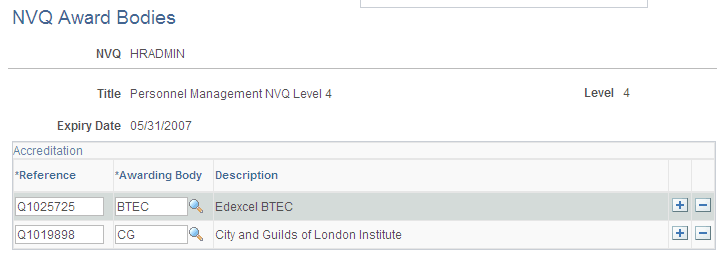
NVQ Award Bodies Page
Use the NVQ Award Bodies page (NVQ_DETAILS) to specifying awarding bodies for NVQs that you have defined in the content catalog.
You must set up NVQs and the NVQ Award Body Table values in before you can use this page.
Navigation:
This example illustrates the fields and controls on the NVQ Award Bodies page. You can find definitions for the fields and controls later on this page.
| Field or Control | Description |
|---|---|
|
Level |
Displays the NVQ level that is defined for the NVQ in the content catalog. |
|
Expiry Date |
Displays the date on which current NVQ details will be reviewed by the awarding bodies. |
|
Reference and Awarding Body |
Select one or more awarding bodies. Enter the reference numbers for each awarding as provided by the NVQ. |