Deleting Parent-Child Duplicates for Rollup
For accurate rollup accounting, the Determine Eligibility/Proration process removes a member from the parent group when that member is also included in a child group. The system deletes the parent-child duplication of membership to avoid double accounting of allocation amounts for the duplicate member.
Example
This diagram illustrates how the parent-child duplicate deletion works. In the diagram, three groups containing workers a through f are created separately in Group Build and arranged in a parent-child tree hierarchy. The parent cell contains workers e, f and g. The first child cell contains workers a, b and cg, and the second child contains workers d, e and f.
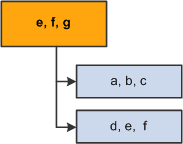
Notice that workers e and f are members of both the parent group and a child group. The allocation amounts for these two workers would be accounted twice in rollup to the parent group if the system did not eliminate the duplication.
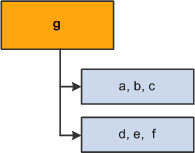
The Determine Eligibility/Proration process removes the duplicate workers (e and f) from the parent group.
This diagram illustrates what the parent-child tree hierarchy looks like after the Determine Eligibility/Proration process is run. As a result, the parent cell contains worker g only. The first child cell contains workers a, b and cg, whereas the second child contains workers d, e and f.
Note:
After the process removes duplicate members from the higher groups, allocation rollup is free of double accounting.
Deleting Duplicates Doesn't Change Group Definitions
The groups in a VC Tree don't always retrieve the same content as if they were used on their own. The Delete Duplicates process is only within Variable Compensation and does not modify the Group Definition that was set up in Group Build.
-
If you generate a list of members for the group ID that is illustrated previously, the list always shows all three workers (e, f, and g) even after the Delete Duplicates process runs.
-
If you use the illustrated group ID for funding and allocation processing, the group appears to have only one member (g).