Setting Up Control Tables for Australian Regulatory Reports
To set up the control tables for regulatory requirements, use the Occupational Category (WGEA_OCCUP_CG_AUS), Australian Standard Classification of Occupations (ASCO) Codes (ASCO_TBL_AUS) components.
These topics discuss how to define Occupational category and ASCO codes.
Pages Used to Set Up Control Tables for Regulatory Requirements
| Page Name | Definition Name | Usage |
|---|---|---|
|
OCCUP_CG_AUS |
Define the occupational categories for managers and non-managers. |
|
|
ASCO_TBL_AUS |
Define occupational codes as per ASCO standard requirements. |
Define Occupational Category Page
Use the Define Occupational Category page (OCCUP_CG_AUS) to define the occupational categories for managers and non-mangers.
Navigation:
This example illustrates the fields and controls on the Define Occupational Category page. You can find definitions for the fields and controls later on this page.
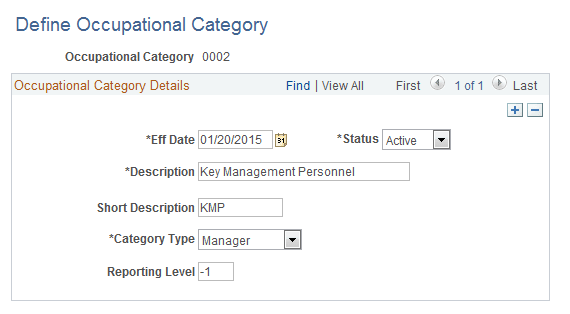
| Field or Control | Description |
|---|---|
|
Eff Date |
Enter the effective date of the occupational category. |
|
Status |
Displays the status of the occupational category. There are two options: Active and Inactive. Note: Before making an occupational category inactive, ensure that there are no active employees mapped to it. |
|
Description/Short Description |
Enter the description/short description for the occupational category. |
|
Category Type |
Select the category of the worker. Value can be either Manager or Non-Manager. |
|
Reporting Level |
Enter the reporting level of the worker to the CEO. If the worker reports directly to the CEO, then his reporting level will be -1, and for each level below, it will be -2, -3 and accordingly. Reporting level is mandatory for managers but not for non-managers. |
Define ASCO Codes Page
Use the Define ASCO Codes page (ASCO_TBL_AUS) to define occupational codes as per ASCO standard requirements.
Navigation:
This example illustrates the fields and controls on the Define ASCO Codes page. You can find definitions for the fields and controls later on this page.
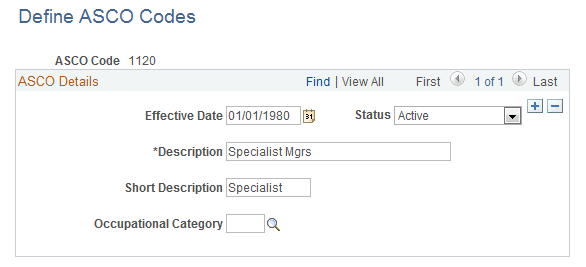
| Field or Control | Description |
|---|---|
|
Eff Date |
Enter the effective date of the ASCO Code. |
|
Status |
Displays the status of the ASCO Code. There are two options: Active and Inactive. |
|
Description/Short Description |
Enter the description/short description for the ASCO Code. |
|
Occupational Category |
Select the Occupational Category. The WGEA reporting is done on the basis of occupational categories. Selecting the Occupational Category in this page, links it to the ASCO codes which are already linked to the job codes in the PeopleSoft HCM system. |