Setting Up Vacation Benefit Plans
To set up the vacation benefit plan tables, use the Benefit Plan (BENEFIT_PLAN_TABLE) and Vacation Plan Table (ABSV_PLAN_TABLE) components.
Pages Used to Set Up Vacation Benefit Plans
| Page Name | Definition Name | Usage |
|---|---|---|
|
BENEFIT_PLAN_TABLE |
Define the basic criteria for vacation benefits. Define all benefit plans. |
|
|
ABSV_PLAN_TABLE |
Define the entitlement rules for accruing vacation leave time for each vacation benefit plan. |
|
|
BEN_PROG_DEFN1 |
Add vacation plans to benefit programs. |
Benefit Plan Page
Use the Benefit Plan page (BENEFIT_PLAN_TABLE) to define the basic criteria for vacation benefits.
Navigation:
This example illustrates the fields and controls on the Benefit Plan page. You can find definitions for the fields and controls later on this page.
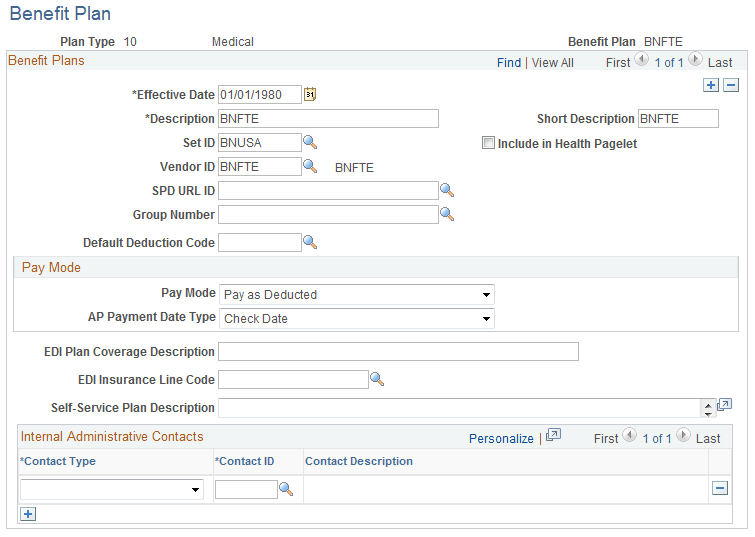
Set up distinct vacation plans for different accrual schedules.
Note:
The following fields are required for the Monitor Absence business process vacation plans; the remaining fields apply to other benefit plans and are documented in the PeopleSoft Human Resources Manage Base Benefits: Benefit Plan Table Page topic. The Benefit Plan Table page and Benefit Plan page are identical.
| Field or Control | Description |
|---|---|
|
Plan Type |
For vacation plans, select the plan type Vacation to access the page. Note: The recommended plan type is Vacation; this plan type is delivered with PeopleSoft HR for vacation processing. Adding or changing plan types often involves complex updates to associated processing logic. |
|
Benefit Plan |
Displays the benefit plan ID that you entered to access this page. |
|
Vendor ID |
Select an ID from the list of providers. If the provider does not appear on the list, access the Provider/Vendor Table component (PROVIDER_TABLE) and add it. Note: For a provider to be valid for a particular benefit plan, that provider must be on the Provider/Vendor Table component with an effective date that is the same as or prior to the effective date of the benefit plan in question. |
Vacation Plan Table Page
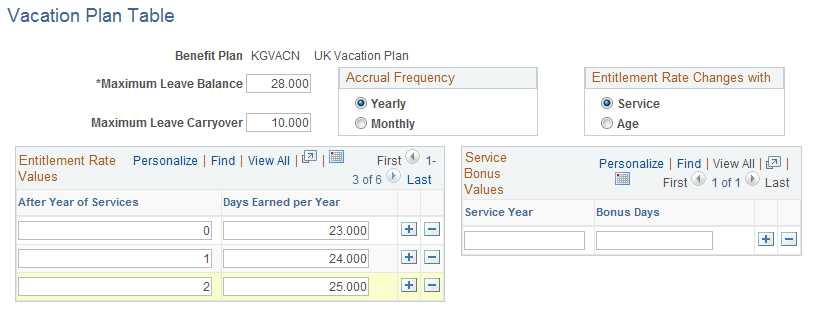
Use the Vacation Plan Table page (ABSV_PLAN_TABLE) to define the entitlement rules for accruing vacation leave time for each vacation benefit plan.
Navigation:
This example illustrates the fields and controls on the Vacation Plan Table page. You can find definitions for the fields and controls later on this page.
| Field or Control | Description |
|---|---|
|
Benefit Plan |
Displays the name of the vacation plan. |
|
Maximum Leave Balance |
Enter the maximum number of days that a person can hold in any one period. |
|
Maximum Leave Carryover |
Enter the maximum number of days that a person can carry into the next period. |
|
Accrual Frequency |
Select the length of the accrual period and how often the process should be run. The default is Yearly, but you can change it to Monthly if necessary. Changing the accrual frequency changes the period prompt in the Entitlement Rate Values and Service Bonus Values group boxes. |
|
Entitlement Rate Changes with |
Select either Service or Age. When you do, the prompt under the Entitlement Rate Values group box changes. |
Entitlement Rate Values
Enter the vacation entitlement schedule under this plan in the Entitlement Rate Values group box according to the person's length of service or age, depending on your selection in the Entitlement Rate Changes with group box.
Service Bonus Values
Enter bonus accruals based only on completion of years of service. Enter figures to three decimal places. The amounts are either per year or per month, depending on your selection in the Accrual Frequency group box.
Benefit Program Table - Benefit Program Page
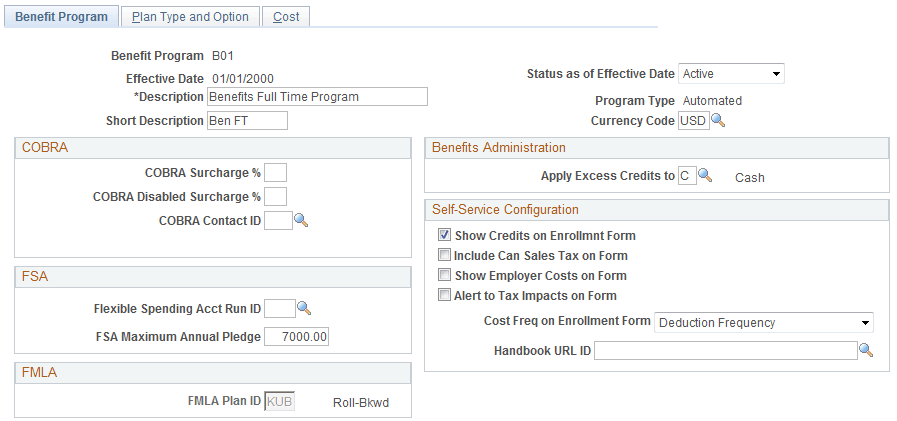
Use the Benefit Program Table - Benefit Program page (BEN_PROG_DEFN1) to add vacation plans to benefit programs.
Navigation:
This example illustrates the fields and controls on the Benefit Program Table - Benefit Program page. You can find definitions for the fields and controls later on this page.
Note:
Many of the fields on this page do not apply to vacation plans.
After defining vacation plans, you must include them in a benefit program. Benefit programs combine various benefit plans into a single program. For example, a benefit program for salaried workers might include a vacation plan, company car plan, and maternity leave plan. When you set up people, you assign them a benefit program. Later, when you enroll individuals in a benefit plan, your plan choices include only those that are available in the benefit program that is assigned to the person.