Entering Family Details
This section discusses how to set up family information.
After you set up the detail data for employees and non-employees, use the Family Information page to enter information about family members.
Page Used to Set Up Family Information
| Page Name | Definition Name | Usage |
|---|---|---|
|
HS_FAMILY |
Enter additional family information for employees or for non-employees who are involved in a health and safety incident. |
Family Information Page
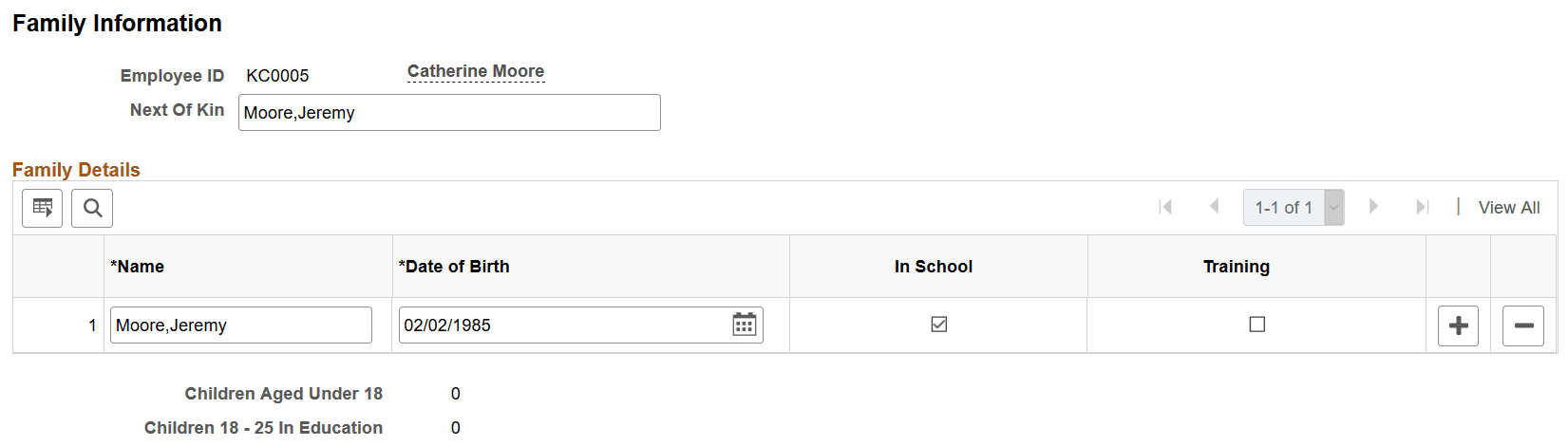
Use the Family Information page (HS_FAMILY) to enter additional family information for employees or for non-employees who are involved in a health and safety incident.
Navigation:
This example illustrates the fields and controls on the Family Information page. You can find definitions for the fields and controls later on this page.
| Field or Control | Description |
|---|---|
|
Next of Kin |
Enter the name of the individual's next of kin using the standard PeopleSoft naming format (Last,First). |
|
Date of Birth |
Enter the birthdates of any children. |
|
In School |
Select this check box to indicate that the child is a student. |
|
Training |
Select this check box to indicate that the child is receiving training. Note: In School and Training information is sometimes needed for reporting purposes. |
|
Children Aged Under 18 |
Based upon the birthdate values and check boxes that you entered and selected, the system automatically calculates and displays the number of children under 18 years of age. |
|
Children 18 - 25 In Education |
Based upon the birth date values and check boxes that you entered and selected, the system automatically calculates and displays the number of children aged 18-25 who are either studying in school or receiving training. |