Reviewing German Employee Checklist Data
This section describes prerequisites for reviewing checklist data and discusses how to use checklists to update medical exam information.
Page Used to Update Medical Exam Information
| Page Name | Definition Name | Usage |
|---|---|---|
|
HS_EMPL_MEDCHK_GER |
View and update medical examination dates and status. |
Prerequisites
An organization's physician can use the Employee Checklist page to view and enter the medical examination dates and exam statuses for employees in a medical checklist.
Before the organization's physician views and updates the status and date of medical examinations using the Employee Checklist page, create medical checklists for employees using the Checklist table, Checklist Item table, and Employee Checklist pages.
In Workforce Administration, the Employee Checklist page appears with the Checklist Date, Checklist, Responsible ID, Comments, Checklist Sequence, andChecklist Item fields. Use these fields to configure checklists for employees.
See PeopleSoft Human Resources Administer Workforce: Understanding Checklists.
Employee Checklist Page
Use the Employee Checklist page (HS_EMPL_MEDCHK_GER) to view and update medical examination dates and status.
Navigation:
This example illustrates the fields and controls on the Employee Checklist page. You can find definitions for the fields and controls later on this page.
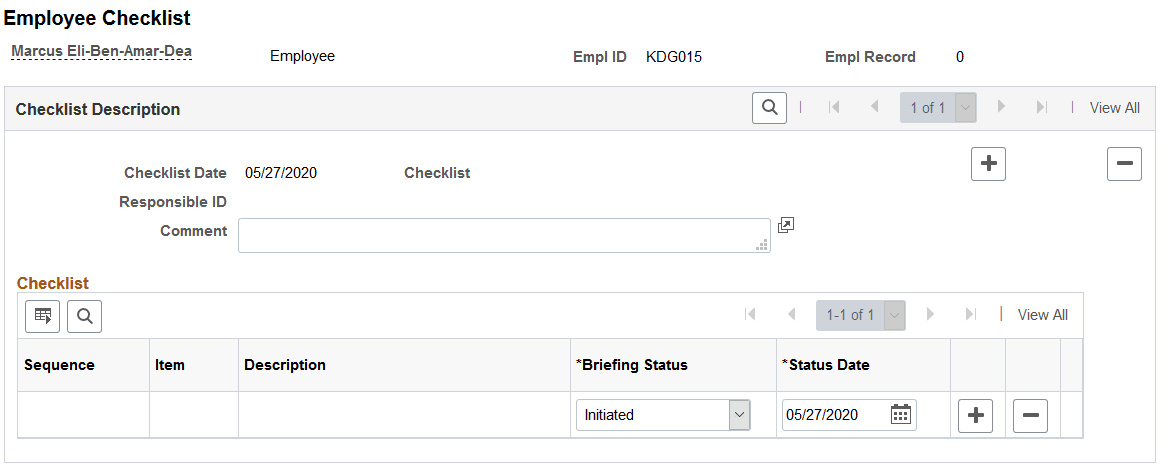
You can add checklist items (exam types) by inserting additional rows.
| Field or Control | Description |
|---|---|
|
Briefing Status |
Update the exam status by selecting from the list of available options: Completed, Initiated, Notified, or Received. |